Drawing Change Detection
Never Miss a Construction Drawing Change Again
Automatically track construction drawing changes between revisions. Stop missing critical updates that cause submittal rejections and costly field rework.
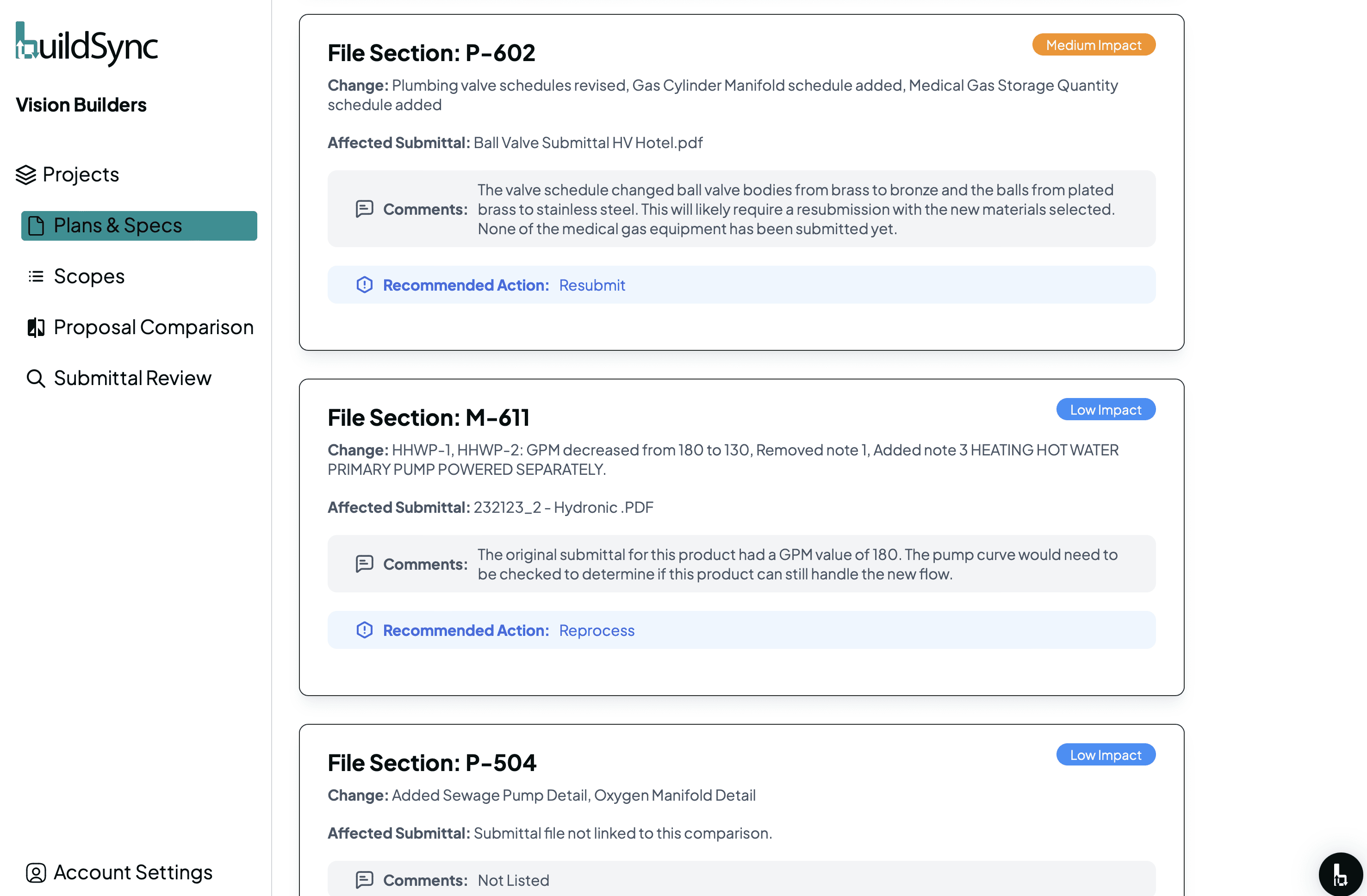
Detect Drawing Changes Automatically
Stop wasting time on manual drawing comparisons and prevent costly errors. See how BuildSync's construction drawing change tracking keeps your construction projects on track - catching every change between drawing revisions while saving hours of manual review.
How Construction Drawing Changes Cost You Time and Money
Missing construction drawing changes causes two problems: Your project managers waste hours on manual comparisons, or critical changes slip through - leading to submittal rejections and costly rework. Each missed change adds 2+ weeks to your timeline and thousands to your budget.
BuildSync compares updated drawings against your project history in minutes, ensuring teams always work from current specifications and preventing errors from outdated information.
Three Ways BuildSync Tracks Construction Drawing Changes
Our construction drawing change tracking feature automatically identifies and highlights changes between drawing revisions, ensuring everyone works from the most current project requirements.
Automatic Version Comparison
Instantly compare drawing versions to identify all changes without tedious manual review. BuildSync analyzes your entire drawing set - architectural, structural plans, MEP, and site documents - extracting every modification. Save 80% of time otherwise spent on manual drawing comparisons and eliminate human error from your revision control process.
Visual Change Highlighting
See clear visual indicators of what changed across your construction project drawings. Additions, deletions, and modifications are clearly highlighted with revision clouds and detailed change logs. Each change includes sheet number, revision number, and date - maintaining complete audit trails for your project history and review cycles.
Requirement Impact Analysis
Understand how construction drawing changes impact submittal requirements. BuildSync automatically flags which existing submittals need reprocessing based on updated drawings, ensuring submittals remain compliant with current specifications even as design changes progress. This prevents submittal rejections before they reach your design team.
Zero Friction Integration with Your Construction Process
BuildSync integrates directly into your project management software - no workflow changes required.
How Drawing Change Detection Works:
Upload new drawing revisions manually or sync automatically through Procore
BuildSync compares against your previous drawing set in the background
Detailed change logs show additions, deletions, and modifications across all sheets
Your team maintains their existing drawing management workflow
Submittal impact analysis updates automatically
Result: Your project managers catch every construction drawing change without spending hours on manual comparisons.
BuildSync integrates with Procore, Trimble, Autodesk Construction Cloud, and other construction management platforms.
What You Get with Automated Drawing Change Detection
Eliminate errors from outdated drawing information
Catch 100% of construction drawing changes between revisions. Your teams always work from the current drawing set, preventing field rework and submittal rejections caused by outdated specifications.
Save hours of manual drawing comparison time
Reduce manual drawing revision comparison from 6-8 hours down to 15 minutes. Free up project managers for high-value coordination work instead of tedious version control tasks.
Prevent costly rework from missed drawing changes
Each missed change that reaches the field costs $5,000-$50,000+ in rework. BuildSync's construction drawing change tracking ensures zero missed changes across your construction projects.
Ready to Transform Your Submittal Process?
Detect Drawing Changes Automatically
Stop wasting time on manual drawing comparisons and prevent costly errors. See how BuildSync's construction drawing change tracking keeps your construction projects on track - catching every change between drawing revisions while saving hours of manual review.
Construction Drawing Change Detection FAQs
Everything you need to know about our submittal review software and integrating BuildSync into your submittal process.
How to manage drawing revisions?
Effective drawing revision control requires automatic version comparison between updated drawings and your project history. BuildSync's construction drawing change tracking compares drawing sets in minutes, highlighting all modifications with visual indicators and maintaining complete audit trails. This eliminates the time-consuming manual comparison process while ensuring teams work from current specifications.