Construction Technology & Innovation
/
Feb 2, 2026
Submittal vs RFI: Key Differences in Construction Explained
Learn the critical differences between submittals and RFIs in construction. Clear explanations, examples, and when to use each process for your projects.


It's 3 PM on a Thursday, and your project manager just received what's labeled as an "RFI" from a subcontractor. Except it's not asking a question - it's 47 pages of product data for an air handler. Meanwhile, another sub just submitted actual questions about conflicting clearance requirements in a document titled "Submittal Package."
If this sounds familiar, you're not alone. The result? Delayed approvals, frustrated design teams, and that stubborn 30% rejection rate that's accepted as "just how it works."
Here's what most people miss: RFIs and submittals aren't just different documents. They're interconnected parts of a larger communication system - along with specifications - that keep construction projects moving.
Understanding how these three elements work together prevents costly errors that add weeks to your schedule and thousands to your budget.
The Construction Communication Ecosystem: RFIs, Submittals, Specifications
Before diving into the differences, understanding RFIs and submittals requires grasping the three-part system that governs construction project documentation:
Specifications define the requirements - the rulebook for what's acceptable. RFIs clarify the rules when they're unclear or contradictory. Submittals prove you're following the rules with your proposed products and methods.
Each serves a distinct purpose in the construction process. Specifications provide the benchmark. RFIs resolve information gaps. Submittals demonstrate compliance. When these three work together properly, projects stay on schedule. When they get confused, you're looking at rejection cycles, schedule delays, and the administrative nightmare of reprocessing everything.
Let's break down each component, starting with the foundation.
What Is a Specification in Construction?
Construction specifications are detailed requirements in construction documents that outline materials, methods, quality standards, and performance criteria essential for project success.
Think of specifications as your project's technical rulebook. While drawings show you where things go, specifications tell you what goes there and how it should perform. They're typically organized by CSI MasterFormat divisions - Division 23 for HVAC, Division 26 for Electrical, and so on.
Construction specifications typically include:
Acceptable materials and approved manufacturers
Performance criteria and technical requirements
Installation methods and procedures
Quality control and testing protocols
Code compliance standards and certifications
Warranty requirements and durations
Here's why this matters: Specifications are the benchmark against which both RFIs and submittals are measured. When you issue a construction RFI, you're asking for clarification about the specs. When you submit a submittal, you're proving your proposed product meets the specs. Everything flows from this foundation.
What Is an RFI in Construction?
A construction RFI (Request for Information) is a formal process used in construction project management to clarify ambiguous, missing, or conflicting information in contract documents when specifications or drawings don't provide clear direction.
RFIs are reactive tools - they address problems when they arise during the construction process. They're the formal communication channel for resolving uncertainties before they become costly errors. According to a 2013 Navigant Construction Forum study, the average RFI costs $1,080 to process. That's not just money - it's also time, with median response taking 9.7 days per RFI.
What RFIs Are Used For in the Construction Process?
RFIs serve three primary purposes in construction project management:
1. Seeking clarification on unclear information
Plans and specifications contradict each other. Design intentions are ambiguous. Critical dimensions are missing. Installation methods aren't specified. These information gaps require formal clarification before work proceeds.
2. Proposing substitutions or alternatives
The specified material has a 16-week lead time, but you've found an approved equal available in four. Or you've identified a value engineering opportunity that maintains design intentions while reducing costs. RFIs document these proposals and request further information for approval.
3. Identifying problems or deficiencies
Field conditions don't match structural drawings or design documents. You've discovered a code compliance issue. There's an installation conflict between trades. Existing conditions in a renovation don't align with assumptions. RFIs flag these issues for resolution on time.
Examples of an RFI in Construction Projects
Example 1: Conflicting Information
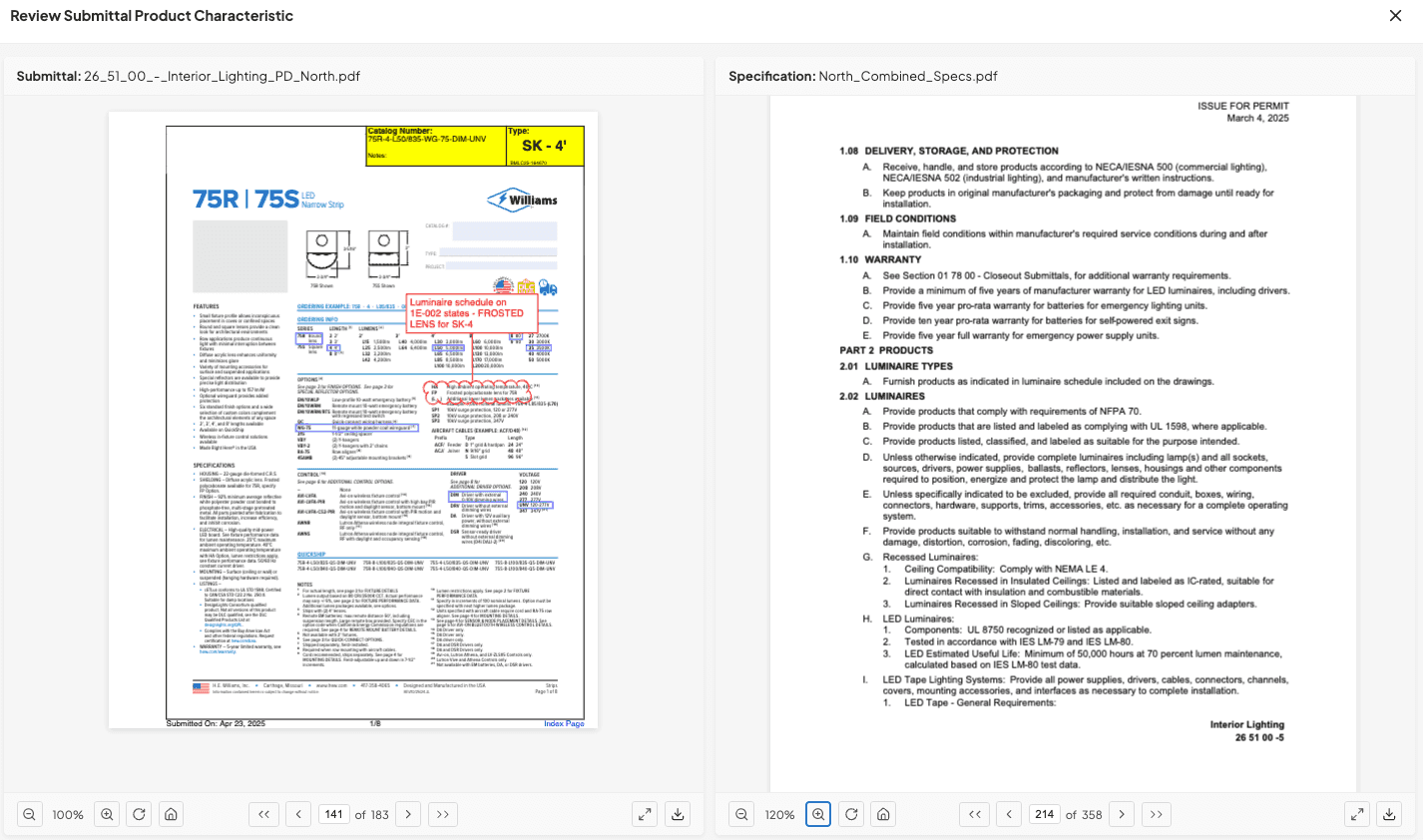
A mechanical contractor discovers the architectural drawings specify 24-inch clearance around an air handler, but the mechanical specifications require 36 inches for maintenance access. The RFI requests additional information on which requirement governs and whether the unit location needs adjustment - important aspects that affect both contract time and installation sequencing.
Example 2: Missing Information
An electrical subcontractor finds the lighting schedule shows "Type A" fixtures in multiple locations, but the specifications don't include manufacturer, model, or technical details for Type A. Catching gaps like these before the submittal leaves the GC's desk is exactly why teams that review electrical submittals against a structured checklist tend to generate fewer RFIs downstream.
Assembling the electrical submittal package with fixture types clearly identified makes these omissions easier to spot early, allowing the missing information to be resolved before procurement begins. The resulting RFI requests the missing information before procurement starts, helping ensure the project meets the design intent.
Example 3: Field Condition Discovery
During excavation in the early stages of construction, a contractor encounters underground utilities not shown on civil drawings. The RFI documents the discovery, requests updated drawings showing actual utility locations, and asks for direction on foundation work - preventing costly errors from proceeding with incorrect assumptions.
Example 4: Proposed Value Engineering
A contractor identifies an HVAC system alternative that's more energy-efficient and reduces operating costs. The RFI includes technical data comparing both systems and requests approval for the substitution, demonstrating how construction professionals can improve project success through proactive problem-solving.
Key elements these RFIs include: Clear issue description, specific document references (drawing numbers, spec sections), location information, cost or schedule impacts, suggested solutions, and response deadlines.
What Is a Submittal in Construction?
A submittal is documentation submitted by contractors or subcontractors to prove that proposed materials, products, or methods meet project specifications and design intentions before installation or procurement.
Submittals are proactive tools - they prevent problems through verification. They're the quality control checkpoint ensuring the $50,000 air handler you're about to order actually meets the 47 technical requirements buried in Division 23 specifications.
The construction industry reality? A 30% rejection rate means most teams are getting this wrong. Each rejection costs an average of $805 and adds 2-3 weeks to the timeline. That's not sustainable.
Why Are Submittals Used in Construction Project Management?
Submittals are used to verify that every material, product, and method proposed for installation actually meets project standards before any work begins or materials are ordered.
Quality Control and Verification
Submittals ensure proposed products match specified requirements. They catch non-compliance before procurement - when it's still just paper, not installed equipment. This maintains design intentions throughout the construction process and prevents costly errors.
Coordination and Communication
The submittal review process allows the design team to verify the contractor's understanding. It facilitates coordination between multiple trades and documents approved products for reference. This creates a paper trail, keeping all stakeholders on the same page about project decisions.
Risk Management
Proper submittals reduce project delays from incorrect materials. They prevent schedule impacts from rejected installations and protect all parties with documented approvals. Most importantly, they ensure code compliance and safety standards essential for project success.
Budget Protection
Submittals prevent ordering wrong materials, avoid costly returns and reorders, reduce construction change directive requests, and maintain both contract sum and project budget integrity.
The submittal review process catches issues when they're still on paper - much cheaper than after installation. The challenge? Manual reviews are time-consuming and prone to oversight. Project engineers commonly spend 20+ hours per week reviewing submittals, increasing the risk of missing critical compliance issues buried in lengthy product data.
BuildSync's automated technical analysis extracts all data points from submittals and compares them against specifications - catching problems before submission rather than after rejection. The result is faster, more thorough reviews that free up your team for higher-value work. That shift naturally raises the question of whether handing that work to AI changes what a PE actually learns on the job, especially for engineers still early in their careers.
According to Monteith Construction's Daniel Recktenwald: "Before BuildSync, we were moving through submittals like quicksand, often overwhelmed and missing problems. After BuildSync, submittals have become something that is part of your day and not your whole week."
What Are Some Primary Uses of Submittals?
Submittals are primarily used by project managers to document and obtain approval for materials, equipment, fabrication details, and installation methods across every construction trade.
Product Approval and Material Selection:
HVAC equipment (air handlers, chillers, boilers, VAV boxes)
Electrical fixtures and devices (lighting, panels, switchgear)
Plumbing fixtures and equipment (pumps, water heaters)
Building materials (doors, windows, finishes, structural steel)
Fire protection systems (sprinklers, alarms)
Fabrication Documentation: Shop drawings for custom-fabricated items, structural steel connection details, millwork and cabinetry designs, precast concrete components, and custom architectural elements. A structural steel connection detail is a common example of a delegated design submittal, where the contractor's own engineer produces and stamps the design rather than the architect.
Quality Assurance and Compliance: Product certifications and test reports, manufacturer warranties, code compliance documentation, performance data and calculations, and material safety data sheets.
Project Closeout: Operations and maintenance manuals, as-built documentation, final test reports, training materials, and warranty documentation.
Reality check: A larger commercial project with dozens of subcontractors may have 500+ individual submittals. Healthcare facilities demand even more - medical gas systems, specialized HVAC, and infection control barriers require extensive documentation to ensure the project meets all regulatory requirements.
The challenge: Manually reviewing hundreds of submittals across all these categories is where most teams struggle. Each submittal contains dozens of technical characteristics that must be verified against specifications. Miss one requirement in a 70-page equipment submittal, and you're facing rejection and resubmission.
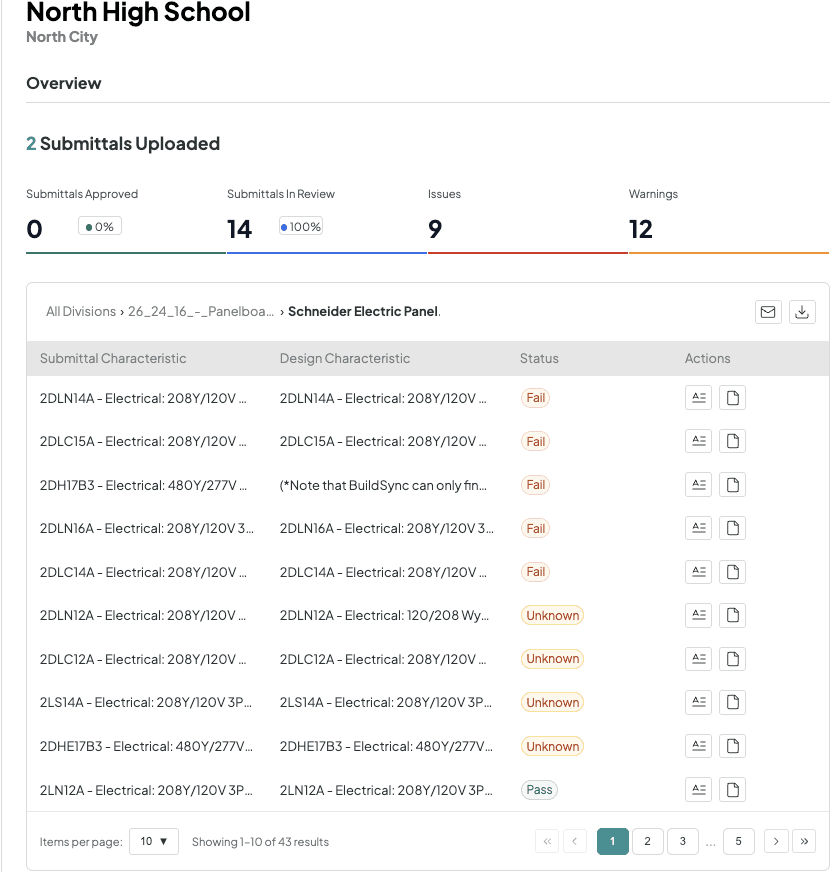
This is exactly where BuildSync transforms the review process. Instead of project managers spending hours extracting data points manually, BuildSync automatically identifies every technical characteristic, compares it against your specifications, and flags passes, fails, and unknowns across all submittal types - from HVAC equipment to fire protection systems.
The Critical Intersection: When RFIs Generate Submittals
Here's where most articles on RFI vs submittals stop, but this is where the real cost lives.
An RFI reveals a spec conflict. The architect revises the specification. Now you need a new submittal that addresses the updated requirements. But that submittal references a product that was coordinated with three other trades. Those trades now need revised submittals too.
One RFI just triggered four resubmittals.
The expensive cycle: RFI process (2 weeks) → revised submittal preparation (1 week) → second review (2 weeks) = 5+ weeks lost. Multiply that across 50 RFIs per project.
Best practice: Catch spec conflicts during the submittal review process - before they become RFIs. BuildSync's automated technical analysis flags conflicts between specifications during initial review in the early stages. Project managers see exactly where plans contradict specs, which requirements are ambiguous, and what needs clarification.
Jacob Delargy, Project Engineer at Monteith Construction, explains the impact:
"BuildSync has helped us review multiple submittals against multiple specs that I would not have thought to reference during my own review process" - reviewing 530 pages in a single submittal.
Submittal vs RFI vs Specification: Side-by-Side Comparison
Aspect | Specification | RFI | Submittal |
Purpose | Defines project requirements and standards | Seeks clarification on unclear/missing information | Proves compliance with specifications |
Created By | Design team (architect/engineer) | Any party needing clarification | Contractor or subcontractor |
Timing | During design phase, before bidding | When confusion or conflict arises | Before procurement or installation |
Direction | Design Team → All project stakeholders | Any party → Responsible party | Contractor/Sub → GC → Design Team |
Content | Technical requirements, approved materials, performance criteria | Questions, proposed alternatives, problem descriptions | Technical specs, product data, shop drawings |
Function | Sets the standard | Clarifies the standard | Proves you meet the standard |
Outcome | Included in contract documents | Clarification provided or direction given | Approved, Revise & Resubmit, or Rejected |
Cost of Issues | Changes require construction change directive | $1,080 average per RFI | $805 average per rejection |
Review Time | N/A (part of contract documents) | 6-10 days average (varies by complexity) | 2+ weeks per rejection cycle |
Key insight: Specifications define requirements (the rulebook), RFIs clarify requirements (asking questions about the rules), and submittals demonstrate compliance (proving you followed the rules). Understanding all three keeps your project on the same page and prevents costly errors.
The Hidden Cost of Confusion
Confusing RFIs with submittals costs construction projects thousands of dollars and weeks of delays through unnecessary revision cycles, extended review times, and cascading schedule impacts.
When teams submit RFIs that should be submittals: The design team gets questions instead of proposed solutions. Response requires another round of documentation. Professional relationships strain. Lost time: 1-2 weeks minimum.
When teams submit submittals without first issuing needed RFIs: Submittals don't address underlying spec conflicts. The 30% rejection rate becomes reality. Each rejection = 2+ weeks delay, threatening project success.
BuildSync's free construction submittal review template outlines the technical criteria your team should be hitting on every submittal package.
The Compounding Effect
Scenario: Mechanical contractor submits RTU-1 submittal without clarifying conflicting clearance requirements.
Weeks 1-2: Initial submittal under review
Week 3: Rejected - doesn't address the conflict between the architectural and mechanical specs
Week 4: RFI issued to clarify which clearance applies
Weeks 5-6: RFI response received with revised requirements
Weeks 7-8: Revised submittal prepared and resubmitted
Week 9: Finally approved
Total: 9 weeks instead of 2 weeks if the RFI had been issued first. Total cost: ~$1,885 ($1,080 RFI + $805 rejection) plus schedule impact.
Teams using BuildSync's automated technical review catch spec conflicts during internal review - before submission. They identify exactly which RFIs to issue upfront, submit clean submittals the first time on time, and achieve 5% rejection rates instead of 30%.
Calculate how much submittal rejections are costing your projects.
How Technology Is Changing Both Processes
For RFI Management
Digital platforms like Procore and Fieldwire centralize the RFI process to track RFIs with automated routing, built-in deadlines, complete audit trails, and mobile access. Benefits include faster response times and better visibility into the construction change directive workflow.
For Submittal Management
Traditional workflow tools provide digital submittal logs, automated routing, and status visibility. They manage where submittals go in project management systems.
The BuildSync Difference
BuildSync performs the actual technical analysis that prevents rejections. It automatically extracts ALL technical characteristics from product data, compares each data point against specifications, and flags passes, fails, and unknowns before submission.
What this means: Review time reduced by 70-80%. Rejection rate drops from 30% to 5%. Junior PEs learn what to check from AI analysis. Senior project managers get time back for higher-value work.
Ready to see how BuildSync helps construction teams eliminate the confusion and reduce rejection rates from 30% to 5%? It helps first to know what a good submittal rejection rate actually is for your position on the project.
Ready to reduce your submittal rejection rate from 30% to 5%? See BuildSync in action.
Conclusion: Getting RFIs and Submittals Right
Understanding the difference between RFIs and submittals isn't just about using the right form. It's about knowing when to ask questions and when to prove compliance. Get this right, and you'll cut your rejection rate dramatically. Get it wrong, and you're looking at weeks of delays and thousands in unnecessary costs.
The teams that excel treat submittals as technical verification, not administrative paperwork. They issue RFIs in the early stages to clarify ambiguities. They catch spec conflicts before submission. And increasingly, they use technology to automate the heavy lifting - because the alternative is burning out project engineers on tedious manual reviews.
Increasingly, that pre-submission catch is being systematized through AI-powered submittal review and automated technical analysis that flags specification mismatches before any human reviewer has to find them.
Ready to see how BuildSync helps construction teams eliminate the confusion and reduce rejection rates from 30% to 5%?
FAQs About Submittals vs RFis
Who is responsible for the RFI and submittal process?
Submittals are prepared by subcontractors, reviewed by general contractors, and approved by design teams. RFIs can be initiated by any project stakeholder who needs clarification, with responses provided by the party responsible for that scope (typically architect or engineer).
Who submits the RFI?
When to issue an RFI versus when to submit project documentation?
Can you issue an RFI and a submittal at the same time?
What happens if a submittal is rejected?
Related reads for you
Discover more articles that align with your interests and keep exploring.


