Construction Technology & Innovation
/
Feb 2, 2026
Free Construction Submittal Log Template (Excel) + How to Use It
Download our free construction submittal template used by top contractors. Includes compliance checklist, approval workflow, and submittal log - ready to use.


Getting 35% of your submittals rejected isn't just frustrating - it's costing your projects thousands of dollars and weeks of delays.
Before you can fix the compliance issues that cause those rejections, you need a construction submittal process to track your project documentation in the first place. That's where a construction submittal template becomes essential.
Most contractors start with Excel. It's familiar, it works offline, and your entire team knows how to use it. A well-structured submittal log template helps organize the chaos of tracking hundreds (or thousands) of submittal packages across multiple projects.
But here's the reality: A template helps you track construction submittals, but it doesn't help to review them. The technical compliance checking - extracting data from 70-page cut sheets and cross-referencing against specifications - still has to happen manually.
This article gives you both: a free submittal log template you can use today, and the strategy to reduce your rejection rate, whether you're using a spreadsheet or more sophisticated tools.
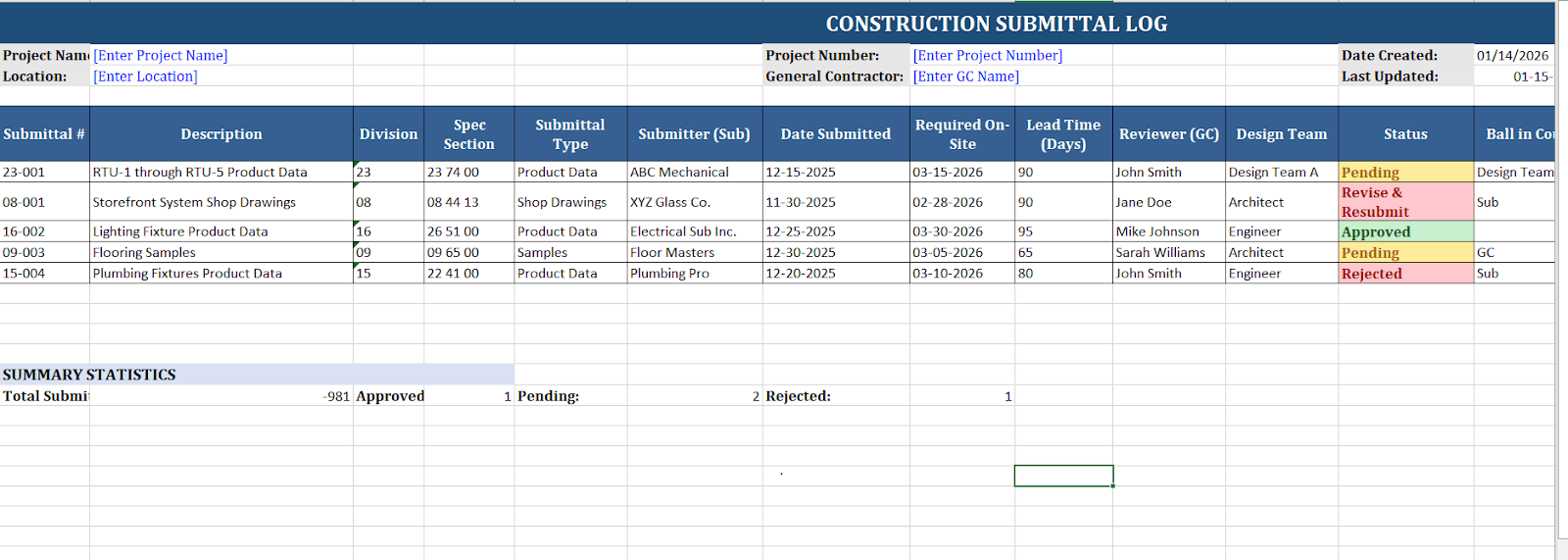
What Is a Construction Submittal Log?
A construction submittal log is a master tracking document that records every submittal on a project - what's been submitted, who's reviewing it, where it is in the approval process, and when it's due back.
Think of it as the control tower for your submittal workflow. On a commercial project with 500, 1,000, or 2,000+ submittal items moving between subs, GCs, and the design team simultaneously, the log is what keeps everyone from losing track of what's approved, what's pending, and what's holding up procurement.
Most teams build their submittal log in Excel. It's familiar, it works offline, and every PM and PE on your team already knows how to use it. A well-structured submittal log template gives you that foundation — organized, consistent, and easy to share across the project team.
What a submittal log doesn't do: Tell you whether the submittals inside it are actually compliant with your plans and specs. That's a separate problem - and the one that causes 30–40% of submittals to get rejected before they ever reach final approval. Pairing your log with a construction submittal review checklist closes that gap by giving your PE a repeatable list of technical checks to run against each package before it ships.
What Makes a Construction Submittal Log Template Useful?
Most submittal log templates available on the internet are simply spreadsheets with a few columns. They'll help you remember what submittal items exist, but they won't help you get them approved.
A template that actually works includes essential aspects for the construction submittal process:
Feature Category | What It Includes | Why It Matters |
Submittal Identification & Tracking | Number, description, specification section, division, type (product data, shop drawings, samples) | Quickly locate specific submittals and understand what's required for each specification section |
Timeline Management | Date submitted, date required on-site, lead time, required return date, actual return date | Track critical procurement deadlines and identify schedule impacts before they cause delays |
Approval Workflow Tracking | Who submitted, who's reviewing, current status, ball in court | Know exactly whose desk each submittal is sitting on and who needs to take action next |
Revision Management | Version number, resubmission dates, previous rejection reasons | Maintain clear history of what changed between submissions and why revisions were needed |
Compliance Notes | Reviewer comments, required corrections, verification checkmarks | Document what needs to be fixed and create paper trail for dispute resolution |
This goes beyond basic tracking. You're documenting the entire lifecycle of each submittal, which becomes critical when you're managing 500+ submittal items on a commercial project and need to quickly identify which submittals are holding up procurement.
Download Your Free Construction Submittal Template - Excel format
Download Free Construction Submittal Template Here
Fully editable for project-specific needs
Works offline with real-time tracking
Compatible with all Excel versions
The template includes:
Submittal Log Tab: Master tracking sheet for all submittals with project ID fields
Compliance Checklist Tab: Pre-built checklist for common construction submittal examples
Approval Workflow Tab: Visual workflow tracker showing submittal status
Instructions Tab: Setup guide and best practices
Customize the template by adding your company logo, adjusting columns for project information, and modifying status categories to match your approval process.
Essential Fields for Reviewing Submittals and Quality Control
Your template is a working document that needs to capture specific project information to ensure compliance:
Submittal Number and Description: Use a consistent numbering system (typically spec section + sequential number, like 23-001 for mechanical submittals). Description should be specific enough that anyone can identify what it covers: "RTU-1 through RTU-5 product data," not just "HVAC equipment."
Division and Specification Section: Link every submittal back to the spec section it addresses. This helps when the design team asks, "Where's the submittal for Section 08 11 13?" and you need to find it in 30 seconds.
Submittal Type: Product data (manufacturer cut sheets), shop drawings (fabrication details), samples (physical materials), or closeout submittals (O&M manuals, warranties). Different types require different review approaches in the submittal review process.
Critical Dates: Date submitted, date required by design team, required on-site date, and actual return date. Track lead times for preventing delays that impact your schedule.
Responsible Parties: Submitter (usually the sub), general contractor reviewer, design team reviewer, current ball in court. When someone asks, "Whose desk is this sitting on?" you need an immediate answer. The party responsible for each step must be clear.
Status and Comments: Current status (pending, approved, revise and resubmit, rejected) plus reviewer comments. This creates a paper trail showing what changed and why, keeping all project stakeholders on the same page.
For projects using Procore, BuildSync's native Procore integration automatically populates most of these fields - pulling submittals from your existing workflow without manual data entry.
Construction Submittal Examples: Types and How to Track Them
Construction submittals fall into three main categories, and each requires different tracking strategies in the construction submittal process:
Product Data Submittals
Manufacturer specifications, cut sheets, and catalog pages proving proposed products meet product specifications. These make up the majority of construction submittal examples on most projects.
Your submittal log template needs to track not just the product name, but specific model numbers, technical specifications, and any required certifications. One cut sheet might cover multiple pieces of equipment - your template should break these out individually as separate line items.
For plumbing specifically, assembling a plumbing submittal package means verifying fixture-by-fixture details such as GPF ratings and backflow certifications, not just recording them in the submittal log.
Shop Drawings
Detailed fabrication drawings showing how specific items will be built, assembled, or installed. Think structural steel connections, custom millwork details, mechanical ductwork layouts.
These take longer to prepare and review than product data submittals. Track additional details like fabrication start date, shop approval timeline, and coordination with other trades to maintain structural integrity.
Samples
Physical materials submitted for approval - carpet samples, paint chips, stone selections, hardware finishes. Your template should note sample location (who has the physical sample), approval status, and whether the sample needs to be archived for future reference.
When asked about the most common mistake contractors make when categorizing submittal types, Tom Port, the co-founder of BuildSync, says:
"The most common mistake we see is treating every submittal the same. Product data, shop drawings, and samples all move at different speeds and require different levels of scrutiny. When they’re lumped together, critical details get missed, reviews slow down, and coordination issues show up later in the field."
Different submittal types flow through different approval paths in the submittal review process. Product data might go directly from the sub to the general contractor to the architect. Shop drawings might require a structural engineer's review. If that structural engineer's review involves stamping the actual design rather than checking someone else's, it may be a delegated design submittal rather than a standard shop drawing, and it's worth tracking that distinction in your log.
Samples might need owner approval. Your submittal log template should reflect these different workflows to keep project stakeholders on the same page.
Why Most Construction Submittals Get Rejected (And How Your Template Can Help)
According to our research with 6,000+ construction professionals, the construction industry averages a 30-40% submittal rejection rate. Each rejection costs an average of $805 in project delays, rework, and coordination impacts before construction begins.
The top reasons for rejection show where the initial review fails to ensure compliance:
Technical non-compliance
The submitted product doesn't meet product specifications. Wrong voltage, insufficient capacity, missing required certifications, or simply the wrong product. This is where most rejections happen - and where a template alone can't prevent costly errors. You need deep technical analysis comparing each data point against specs.
Incomplete documentation
Missing manufacturer specifications, lack of required certifications, no warranty information, and absent O&M manuals. A good template includes a checklist reminding you what needs to be included during the initial review to prevent costly errors before submission.
Wrong product specified
Contractor proposes a substitution without following proper substitution procedures, or submits a product that was never approved as an "or equal." Track approved manufacturers and products in your template.
Missing required details
Dimensions missing, finish not specified, color not selected, installation details incomplete. Your template should have a "completeness check" column, forcing reviewers to verify that all required information is present during the construction submittal process.
Each rejection adds 2+ weeks to your timeline - two weeks you don't have. For a typical commercial project processing 500 submittals at a 35% rejection rate, that's 175 rejections costing $140,000+ in preventable delays before construction begins.
Before your team finalizes the submittal schedule, it's worth getting clear on which items qualify as deferred, and this guide to deferred submittals explains the criteria.
Your template helps you track when submittals are rejected and why - creating data you can analyze to identify potential issues. Are certain subs consistently submitting non-compliant submittals? Are specific specification sections causing problems? This visibility helps you address systematic issues through quality control measures.
Step-by-Step: How to Fill Out Your Construction Submittal Template
1. Set Up Your Project Information
Start by customizing the template header with project name, number, location, and general contractor information. Add your company logo if you're distributing this to subs or using it for client-facing documentation. Include all project ID fields.
2. Import Your Submittal Schedule
Your project specifications (typically Division 01 Section 01 33 00) should include a submittal register listing all required submittals. Input these submittal items into your template at project kickoff - don't wait until subs start asking what submittals they need to provide.
Our guide on construction submittals emphasizes that incomplete submittal documentation is a primary cause of rejection and delay in the submittal review process.
3. Track Submissions in Real-Time
When a submittal arrives, immediately log it in your template. Don't batch-process at the end of the week - you'll lose track. Record submission date, who submitted it, and assign it to the party responsible for review to maintain open communication.
4. Document Reviewer Feedback
When submittals come back from the design team, record their response in detail during the initial review. Don't just mark "revise and resubmit" - note specific corrections required. This creates a reference for the resubmission and keeps teams on the same page.
5. Manage Resubmissions Toward Final Approval
When a revised submittal comes back, create a new row (or increment the revision number) linking back to the original. Track what changed between revisions - this becomes critical if disputes arise about what received final approval.
6. Generate Status Reports
Use your template to create weekly status reports showing: submittals pending general contractor review, submittals with design team, submittals with final approval ready for procurement, submittal rejections requiring action. This clear communication keeps project stakeholders aligned.
Beyond Templates: When Tracking Isn't Enough in the Construction Submittal Process
Your template tracks submittals. But it doesn't review them for compliance.
The reality: Project engineers commonly spend 20+ hours per week manually reviewing submittals - extracting data from manufacturer cut sheets, cross-referencing against product specifications, checking code compliance, and verifying design intent. That's time taken away from coordination, RFIs, jobsite oversight, problem-solving, and all the other critical quality control work PEs should be doing.
This contributes to the industry-wide labor shortage. According to AGC research, 77% of construction firms can't fill open positions. You can't afford to waste the PEs you have on tedious data extraction when they should be ensuring structural integrity and preventing delays.
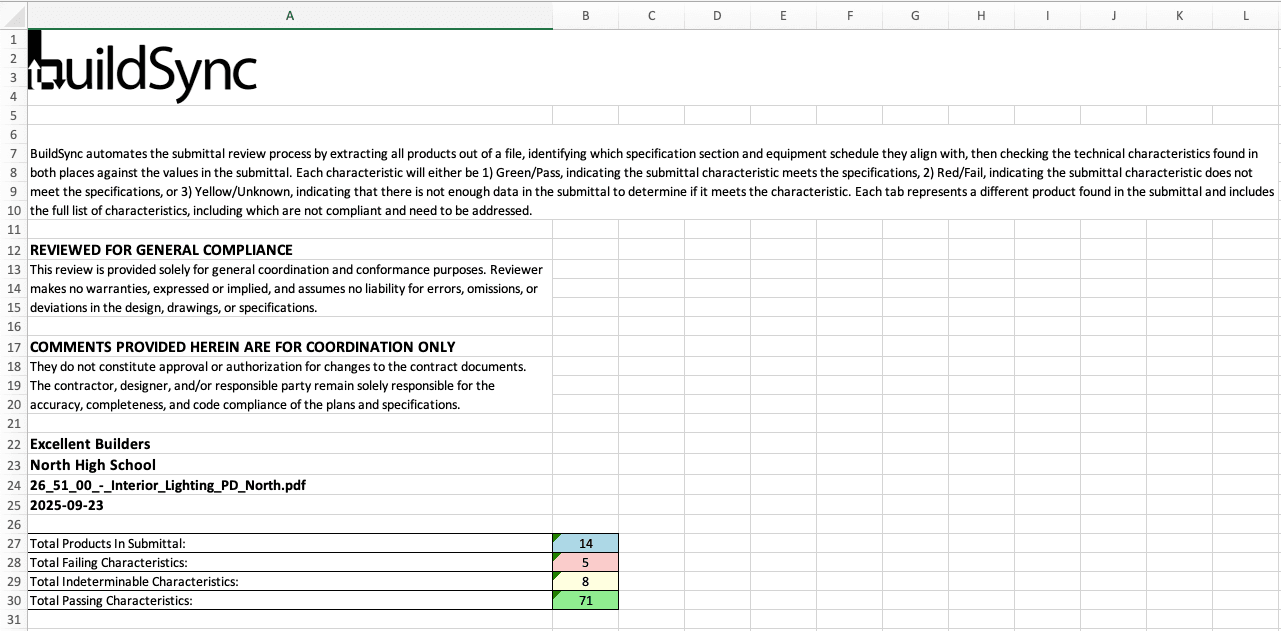
Modern construction submittal review software automates the technical heavy-lifting in the submittal review process: extracting technical characteristics from submittals, comparing them against project specifications to ensure compliance, flagging non-compliant items before they reach the design team, and generating detailed compliance reports.
The difference: BuildSync handles systematic data extraction and specification comparison in hours instead of days. Your team reviews the findings and makes the final approval call. It's the same construction submittal process - just dramatically faster and more thorough, with a clear understanding of what meets specs.
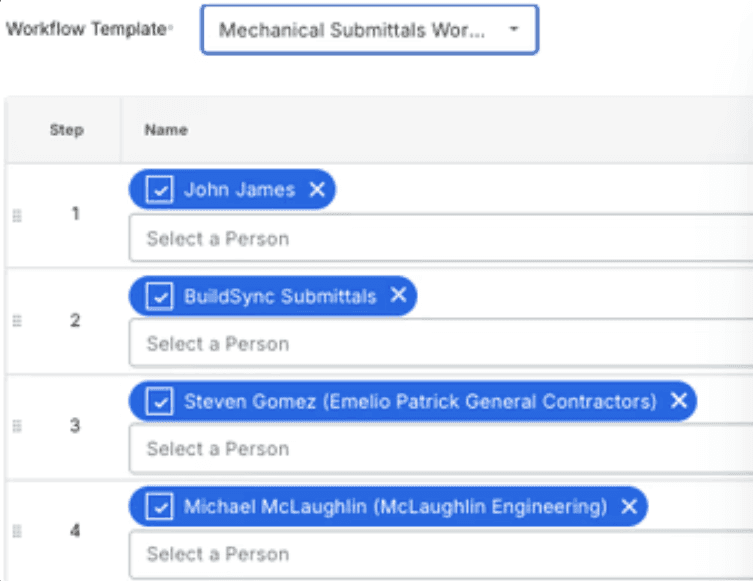
For GCs using Procore & ACC, BuildSync operates as an actor within your existing submittal workflow. Submittals flow through BuildSync's review automatically before reaching the design team. No workflow changes. No retraining. Just better results through superior quality control.
Want to eliminate 80% of manual submittal review time? See how BuildSync automates the compliance checking process while maintaining your existing workflow.
Submittal Log Template Best Practices for Preventing Delays
Update in Real-Time
Don't batch-process submittal tracking at the end of each week. Log submittal items the day they arrive, update status as soon as reviews come back. Your submittal log template is only useful if it reflects the current reality.
Color-Code for Quick Reference
Use conditional formatting in Excel to highlight status: green for approved, yellow for pending, red for rejected. Your team should be able to glance at the template and understand project status immediately, keeping everyone on the same page.
Include Detailed Notes
The "Comments" column isn't optional. When a submittal is rejected, note exactly why - in enough detail that the sub understands what needs to change. When approved, note any conditions or clarifications to ensure clear communication.
Set Up Automated Reminders
If using digital templates, configure reminders for upcoming due dates. But remember: automated reminders don't catch technical non-compliance - they just tell you when you're running out of time in the construction submittal process.
Share With All Project Stakeholders
Knowing when to use an RFI vs submittal prevents misrouted documentation that delays your project - RFIs clarify unclear requirements while submittals prove compliance with known specifications. Your submittal log isn't a private document. Subs need visibility into what's approved so they can procure materials. The design team needs to see what's pending review. The owner needs to understand the timeline impacts. Clear communication prevents costly errors.
Archive Systematically
When projects close out, your submittal log becomes part of permanent project documentation. Organize it with project ID fields so facility managers can find what they need years later when equipment needs maintenance or replacement.
The Bottom Line: Track Smarter, Approve Faster
The free construction submittal template gives you a solid foundation for tracking construction submittals across your projects. It organizes the chaos, creates accountability, and provides visibility into submittal status in the construction submittal process.
But remember: submittal log templates organize information. They don't verify compliance.
If you're struggling with high rejection rates, schedule delays from rejected submittals, or PEs spending excessive time on manual reviews, the problem isn't your tracking system - it's the submittal review process itself.
The best construction teams are solving this with AI-powered technical analysis that catches non-compliance before submittals reach the design team. They're processing submittal items in hours instead of days. They're driving rejection rates below 5%. And they're freeing up their project engineers to do the coordination and problem-solving work that actually requires human judgment - the quality control activities that prevent costly errors and keep project stakeholders aligned.
Frequently Asked Questions
What are construction submittals and their purpose?
Construction submittals are formal documentation packages - shop drawings, product data, material samples, or other information - that contractors submit to architects and engineers for approval before materials are purchased or construction begins. Their purpose is quality control: verifying that proposed materials, equipment, and construction methods meet product specifications and design intent before installation. Submittals create a paper trail documenting what received final approval, protecting all project stakeholders if disputes arise.
How to make a submittal for construction?
How long should submittals be kept on file?
Who is responsible for submittal management on a construction project?
Related reads for you
Discover more articles that align with your interests and keep exploring.


