Construction Technology & Innovation
/
Dec 21, 2025
What is a Submittal Package and How to Create one: Complete Step-by-Step Guide
Complete guide to creating construction submittal packages. Learn what to include, requirements by trade, documentation needed, and how to streamline the 8-12 hour process.


Creating a submittal package is one of the most time-consuming tasks in construction - and one of the most critical. Get it wrong, and you're looking at rejection, delays, and timeline impacts that cascade across your entire project.
Here's how it usually goes: It's 4 PM on a Friday. You've spent the last 10 hours creating a submittal package for your RTU-1. You've combed through 70 pages of manufacturer data, cross-referenced 30+ spec requirements, and formatted everything perfectly. You hit submit. Two weeks later, it comes back rejected - you missed one air filter efficiency rating buried on page 47. Now you're starting over, and your procurement timeline just slipped by a month.
This scenario plays out on construction projects every single day. The reality is that preparing submittals is one of the most time-consuming and error-prone tasks in construction - and the stakes are high. It's about keeping your project on schedule and ensuring project completion stays on track.
This guide walks you through everything you need to know about what is a submittal package in construction - what they are, what to include, and how to create them efficiently.
Whether you're a junior PE creating your first package or a PM looking to streamline the submittal process for your team, you'll learn the step-by-step approach to building comprehensive, compliant submittal packages that actually get approved.
Before you can systematically track and organize your submittals, having a reliable tracking system is essential - download our free submittal template to get started with proper documentation from day one.
What is a Submittal Package In Construction?
A submittal package is a comprehensive collection of technical documentation that demonstrates a proposed construction product, material, or system meets the project specifications. It's submitted by specialty contractors to general contractors, and ultimately to the design team (architects/engineers) for approval before installation or procurement.
The purpose of a submittal package is straightforward: prove compliance with contract requirements before you order or install anything. This prevents costly mistakes - ordering equipment that doesn't meet specs, installing materials that get rejected, or discovering non-compliance issues after the fact when replacements can cost six or seven figures.
What is the difference between a submittal and a submittal package?
There's an important distinction, though in practice people sometimes use the terms interchangeably:
A submittal refers to documentation for a single product or material - for example, a rooftop unit (RTU-1) or a specific light fixture
A submittal package is a collection of multiple submittals grouped together - typically all products of the same type across a project. For example, a "Fan Submittal Package" would include documentation for all the fans on your project (Fan-1, Fan-2, Fan-3, etc.)
That said, when someone refers to "the fan submittal," they might actually mean the fan submittal package - the terminology isn't always precise in practice.
Submittal packages are typically created during preconstruction or early construction phase, usually by project engineers, though sometimes project managers or preconstruction coordinators take the lead depending on project structure and team size.
Why Submittal Packages Matter
Here's the hard truth: each rejection adds 2+ weeks to your timeline, and the industry average rejection rate sits at 30%. That means more than one out of every three construction submittals you send out is coming back for revisions. Each rejection cycle doesn't just delay that one piece of equipment - it creates cascading schedule impacts across your entire project, affecting project stakeholders from the project owner to specialty contractors.
The most common reason for rejection? Missing a single technical characteristic. It could be a sound rating, an efficiency requirement, a certification, or a material specification buried in a 70-page product data sheet. When your submittal package doesn't address every requirement in the specs, it's getting sent back through the approval process again.
This is where tools like BuildSync submittal package generation help construction teams catch issues before packages reach the design team - by extracting and verifying all technical characteristics automatically to ensure compliance, reducing that 30% rejection rate down to 5%.
What to Include in a Submittal Package?
Understanding the difference between submittals and RFIs prevents confusion that leads to delayed approvals and wasted review cycles - submittals prove compliance while RFIs clarify ambiguous requirements.
A complete submittal package must include product data sheets, technical specifications, compliance documentation, manufacturer certifications, and supporting materials that prove the proposed product meets all project requirements. Missing even one component can result in rejection and costly delays in the approval process.
Core Documentation
Every submittal package starts with these essential submittal documents:
Product Data Sheets are the foundation - they contain technical specifications, dimensions, performance ratings, and operating parameters for your proposed product. These data sheets come directly from manufacturers and should always be the most current version available.
Manufacturer Literature includes cut sheets, catalog pages, and installation instructions that provide additional technical details and context. For complex equipment like HVAC systems or electrical switchgear, this documentation can easily run 50-100 pages.
Certifications and Testing documentation proves your product meets required standards. This includes UL listings, fire ratings, energy efficiency certifications (like ENERGY STAR), seismic certifications, and any third-party testing results the specs call for. Don't assume your reviewer will look these up - include them explicitly to ensure compliance.
Compliance Documentation is where you demonstrate how your product meets specifications. This typically includes a compliance matrix or checklist that maps submittal values to spec requirements, noting any deviations or clarifications needed for quality control. That compliance matrix becomes even more effective when paired with a pre-submission quality check that walks through every spec section the package needs to address, so nothing gets missed between documentation and transmittal.
Division-Specific Requirements
Different construction divisions require different types of documentation. Understanding what your specific trade needs is essential to creating complete packages. The Construction Specifications Institute's MasterFormat provides the industry-standard organization system for managing submittals across construction projects.
Division | Trade | Key Technical Requirements | Typical Documentation |
|---|---|---|---|
Plumbing | Flow rates (GPF, GPM), Pressure ratings, Water efficiency, Backflow prevention, Potable water materials | Fixture specs, Flow rate calculations, WaterSense certifications, Backflow preventer details | |
HVAC/Mechanical | Capacity (tons, BTU/hr, CFM), Efficiency (SEER, EER, COP), Refrigerant type, Sound ratings (dBA), Filter specifications | Equipment schedules, Capacity calculations, AHRI ratings, Warranty docs, Startup requirements | |
Division 26 | Electrical | Voltage, Wattage, Photometric data, Lumens, Color temperature, Control specifications, Dimming compatibility | Fixture schedules, Photometric reports, Title 24/ASHRAE 90.1 compliance, Control sequences |
Finishes | Flooring, Walls, Ceilings | Physical samples, Color charts, Material composition, Slip resistance, Fire ratings | Physical samples, MSDS, FloorScore/Greenguard certs, Installation methods |
Supporting Materials
Beyond the core technical documentation, complete submittal packages include:
Cover sheets that clearly identify the submittal number, spec section being addressed, product/equipment name and tag number, submitting contractor information, submission date, and required response date.
Submittal logs help track where each submittal is in the submittal process - essential for managing submittals across dozens or hundreds of packages on large construction projects. Before you can build that log, you need a complete submittal register derived from the project specifications because the register defines which submittal packages the project actually requires.
Previous correspondence like related RFIs should be referenced when they impact the submittal. If you clarified a spec requirement through an RFI, include that in your package.
Shop drawings and installation instructions are relevant when the installation method or custom fabrication impacts compliance with specifications - for example, seismic bracing requirements following SMACNA guidelines or special mounting configurations.
Here's the critical point: EVERY spec requirement must be addressed in your submittal package. The specs call out 30 technical characteristics for your equipment? Your package needs to address all 30. Miss one, and you're getting that package kicked back, losing 2+ weeks on your timeline.
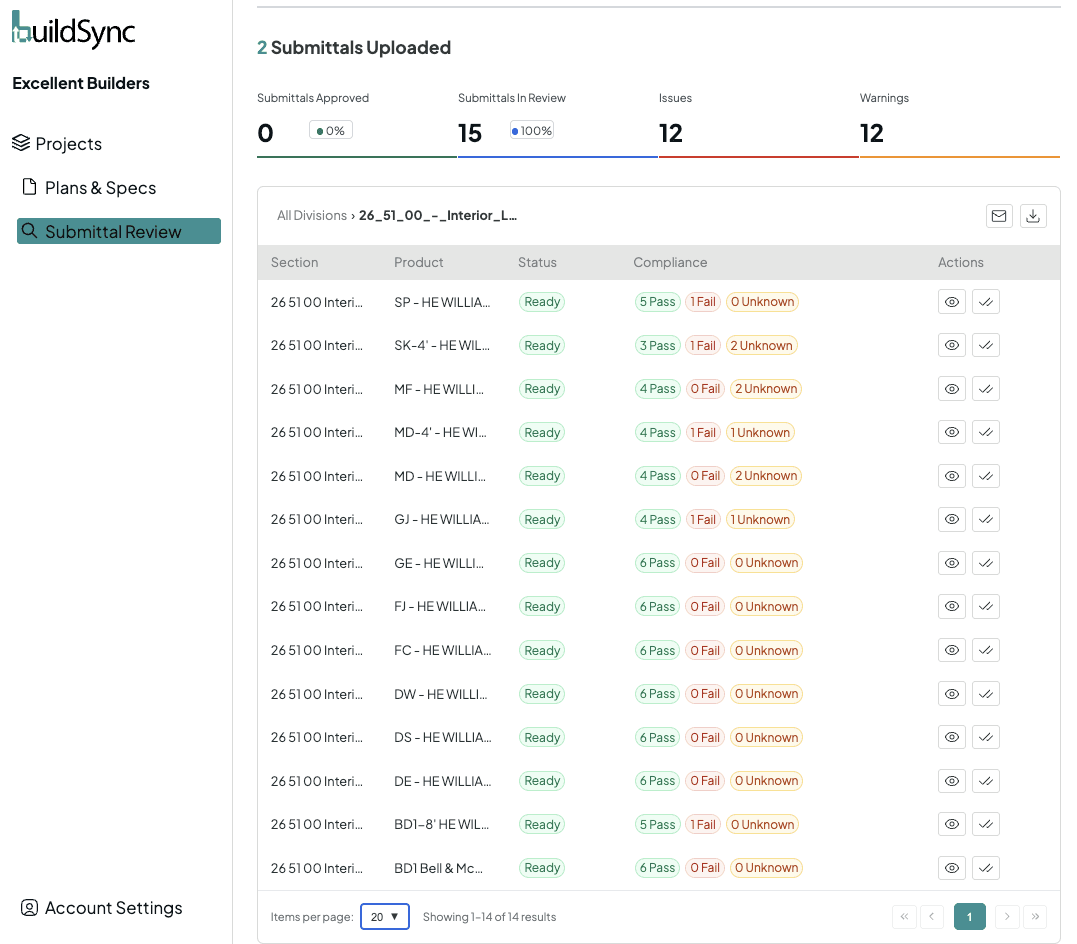
This is where BuildSync's deep technical analysis makes a difference - it automatically extracts all technical characteristics from your product data and compares them against specifications, flagging any missing or non-compliant items before you submit.
For what a complete submittal package actually looks like once every section is filled in, this walks through a real one piece by piece.
For teams without the in-house bandwidth to build packages this way, the next question is whether it's worth outsourcing submittal package preparation to a third-party firm. Understanding the tradeoffs between cost, control, and turnaround can help determine which approach fits your workflow.
You catch the issues before the design team does, ensuring a successful project delivery.
How to Create a Submittal Package: Step-by-Step Process
Creating a submittal package involves gathering all product documentation, extracting technical specifications, comparing them against project requirements, organizing the materials logically, and preparing compliance documentation - a process that traditionally takes 8-12 hours per package.
Let's break down the entire process so you can create comprehensive, compliant packages efficiently.
Step 1: Review Construction Project Specifications
Start by identifying which spec sections apply to your product. For an air handler, you're likely working with Division 23 sections covering HVAC equipment, but you might also need to reference electrical specs for power requirements or architectural specs for equipment room dimensions.
Note all project requirements as you go: dimensions, performance ratings, efficiency requirements, material specifications, certifications, and any special conditions or exceptions. Flag anything ambiguous for an RFI - don't guess at what the design team wants.
Check for addenda and modifications to the contract requirements. Specifications change during the project, and you need to be working from the most current version. That clarification issued three weeks ago? It applies to your submittal.
Reality check: This step alone takes 2-3 hours for complex equipment. You're reading through potentially 50+ pages of specifications, pulling out every requirement that applies to your product.
The distinction between standard and deferred submittals matters more than most teams realize, and BuildSync put together a straightforward deferred submittal explainer that covers the key differences.
Step 2: Gather Product Documentation
Collect manufacturer cut sheets and download the complete technical data sheets for your product. Start with the manufacturer's website, but verify with your vendor rep that you have the latest versions - manufacturers update product data regularly.
Obtain all required certifications: UL listings, AHRI ratings, energy efficiency certifications, fire ratings, seismic certifications. Don't wait until Step 6 to discover you're missing a certification document.
Gather warranty information and compile installation instructions if they're relevant to your submittal review. Some projects require specific warranty terms that you'll need to verify and document.
Pro tip: Create a checklist for your specific product type. Once you've done one air handler submittal package, you know exactly what documentation you'll need for the next one.
Step 3: Extract Technical Characteristics
This is where most PEs lose the most time - and where most errors occur when preparing submittals. You need to pull all technical data points from your product literature: dimensions, weights, capacities, flow rates, pressures, temperatures, materials, finishes, electrical characteristics, efficiency ratings, sound levels, certifications... the list goes on.
For a complex piece of equipment like an air handler, you're easily looking at 30-40 distinct data points spread across 50+ pages of manufacturer literature. Each one needs to be documented with its location (page number, section) so reviewers can verify your information during the submittals review process.
Create a comparison matrix showing submittal value versus spec requirement for each characteristic. This becomes your compliance documentation in the next step and serves as a critical quality control measure.
Note any deviations or exceptions. If your product doesn't exactly match a spec requirement, you need to document why and propose an alternative or clarification.
Traditional pain point: This step takes 4-6 hours for complex equipment. You're going page by page through manufacturer data, pulling out specifications, and cross-referencing against your project specs. Miss one characteristic buried on page 47, and you're getting that package rejected.
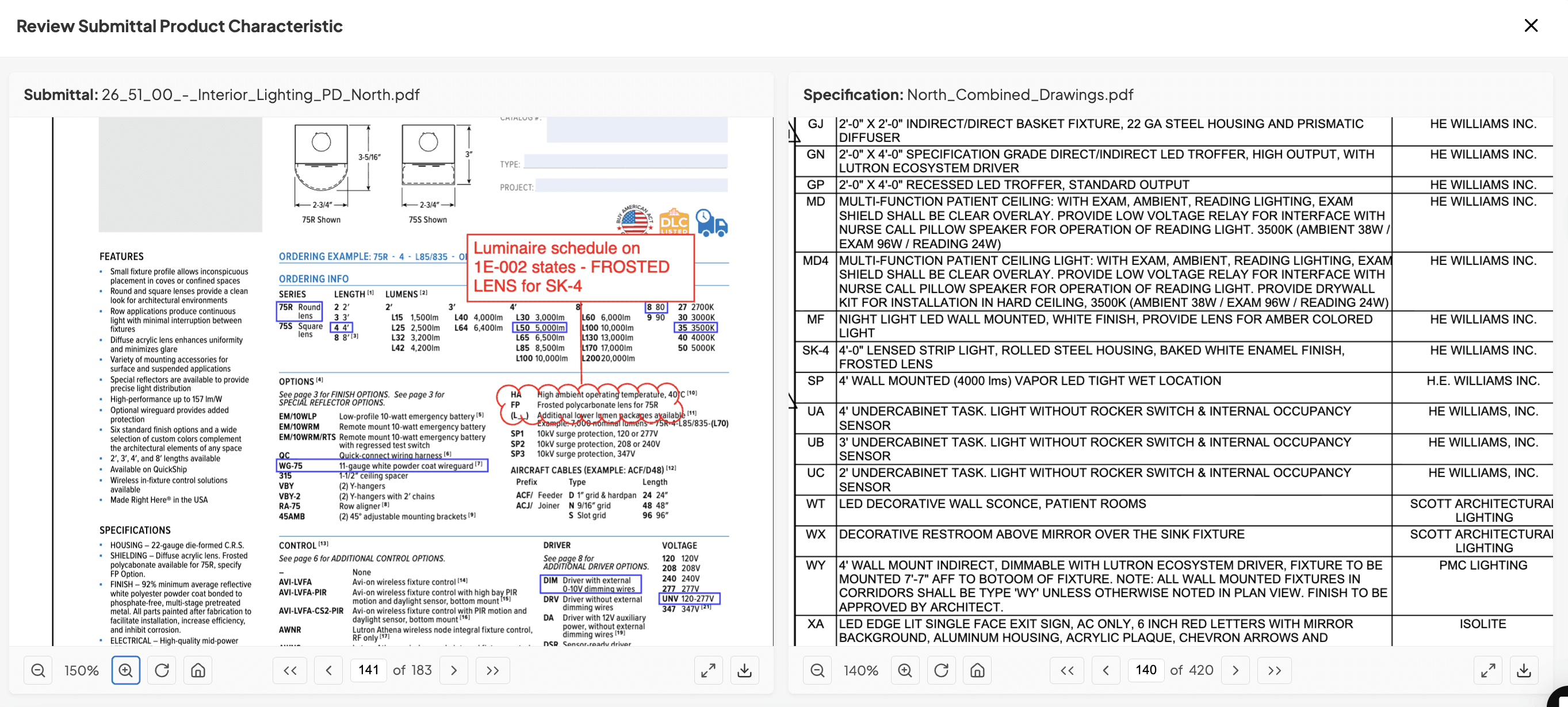
This is where BuildSync fundamentally changes the game. Instead of spending 4-6 hours manually extracting characteristics, BuildSync pulls all data points automatically in minutes. It compares each one against your specifications and flags passes, fails, and unknowns - showing you exactly where to focus your attention.
Step 4: Verify Compliance
Now check each requirement against your product specifications to ensure compliance. You should have three categories:
Passes: Product specification meets or exceeds the requirement. Document this clearly.
Fails: Product specification doesn't meet the requirement. You need to either find a different product, request a substitution, or clarify through an RFI if you believe there's flexibility in the contract requirements.
Unknowns: Information isn't clearly stated on either the product data or specifications, or there's ambiguity that needs resolution. These need clarification before submission.
Document reasons for any non-compliance. If you're proposing an alternative solution or requesting a substitution, explain why and include supporting documentation showing it's equivalent or better.
Prepare clarifications or alternatives if needed. Sometimes you'll find that specs call for something that's no longer available or has been superseded by better technology - document this thoroughly.
This is where the 30% rejection rate comes from. Missing a single requirement - a certification, an efficiency rating, a material specification - means your package is coming back for a revision cycle. Every rejection adds 2+ weeks to your timeline and delays procurement or installation.
Step 5: Organize Documentation
Create a logical document structure. Most construction projects have specific requirements for how submittal packages should be organized, but the general approach is:
Cover sheet with identifying information
Compliance matrix or submittal data sheet
Product data sheets (organized by tag number or sequential order)
Certifications and testing documentation
Warranty information
Shop drawings and installation instructions (if applicable)
Related RFIs or correspondence
Add cover sheets with clear project identifying information: project name and number, submittal number and revision, spec section addressed, product name and tag number, submitting contractor, submission date, and required response date.
Include your submittal log tracking information so this package can be tracked through the approval process.
Number pages consistently throughout the entire package. Reviewers need to be able to reference specific pages in their comments.
Highlight key compliance points in your product data. Use highlighters, callout boxes, or notes to draw attention to where critical specifications are met. Make it easy for reviewers to find what they're looking for.
Best practice: Use consistent organization across all your submittal packages. Train your team on the same structure. When reviewers know where to look for information, reviews go faster.
Step 6: Create Compliance Documentation
Prepare your spec compliance sheet - this is your roadmap showing how each requirement is met. The format varies by project, but typically includes:
Spec section and paragraph number
Requirement description
Submittal value
Location in product data (page number)
Compliance status (meets/exceeds/does not meet)
Notes or clarifications
Mark up product data showing where requirements are met. Use highlights, arrows, callout boxes - whatever makes it crystal clear where reviewers can verify the information.
Add notes for any clarifications needed. If something requires interpretation or there's ambiguity, address it proactively. Don't make reviewers guess at your intent.
Include references to relevant RFIs. If you've clarified a requirement through the RFI process, cite that RFI number and date in your compliance documentation.
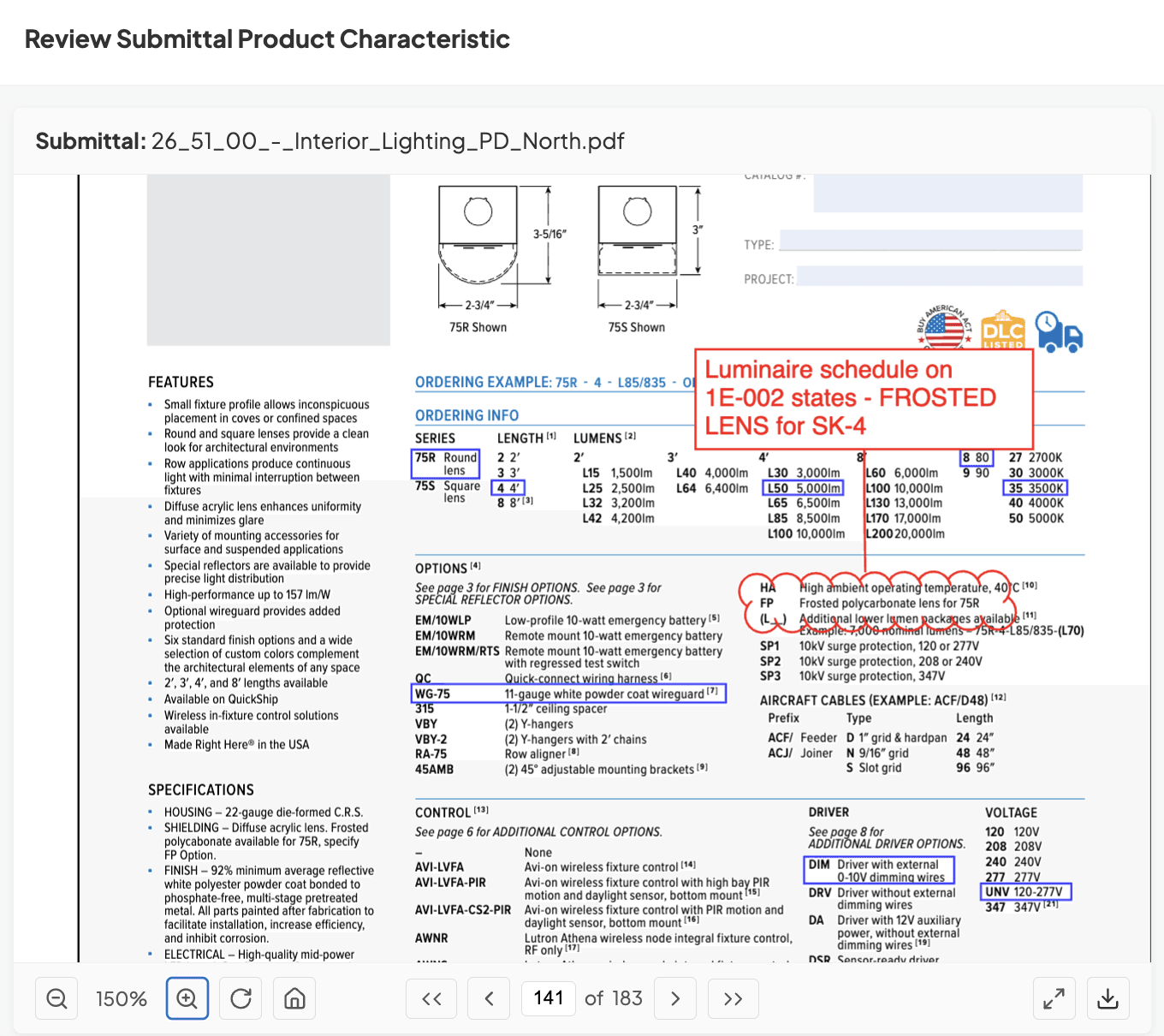
BuildSync generates these marked-up PDFs and Excel compliance reports automatically. Your review team gets a clear picture of exactly what passes, what fails, and what needs clarification - with direct references to both the product data and specifications.
When asked about the most common mistake PEs make when creating submittal packages, Tom Port, the co-founder of BuildSync, says:
The most common mistake in submittal package generation is focusing on compiling documents rather than clearly demonstrating specification compliance, which we find consistently leads to rejections and schedule delays.
Step 7: Quality Review of Construction Submittals
Double-check all technical characteristics against your comparison matrix. This is your last chance to catch errors before submission and ensure compliance.
Verify all certifications are current and match what's being specified. An expired certification is as good as no certification.
Confirm page numbers and references are accurate throughout your compliance documentation. If you tell a reviewer to check page 23 for sound ratings, make sure the sound rating is actually on page 23.
Have a second set of eyes review if possible. Fresh eyes catch things you've been staring at for hours - this quality control step is essential for a successful project.
Or skip the manual quality review headache entirely. BuildSync automatically verifies every technical characteristic against specifications before you submit, flagging passes, fails, and unknowns with direct references to source documents. No more wondering if you missed something on page 47.
Step 8: Submit Through Proper Channels
Upload to Procore or your project management system following your project's specific submittal procedures.
Include all required transmittal documentation - cover letters, routing information, required response dates. Track submission in your submittal log with date submitted, submitted to whom, and expected return date.
If you're using BuildSync's Procore integration, this step becomes seamless - submittals flow through BuildSync's review automatically before reaching the design team, catching issues before they cause rejections and keeping project stakeholders aligned.
List of Submittal Package Sections: Required Fields
Every submittal package should contain standardized sections including cover sheet information, product identification, technical specifications, compliance documentation, and certifications - with specific fields varying by division and project requirements.
Understanding these required fields ensures your packages are complete before submission. According to Procore's comprehensive guide on construction submittals, incomplete submittal documents are one of the primary causes of rejection and delay in the approval process.
Cover Sheet/Transmittal Information
Your cover sheet is the first thing reviewers see. It needs:
Project name and number
Submittal number and revision (e.g., S-23-001, Rev. 0)
Spec section being addressed (e.g., 23 74 00 - Packaged Outdoor HVAC Equipment)
Product/equipment name and tag number (e.g., RTU-1, RTU-2)
Submitting contractor information (company name, contact, phone, email)
Date of submission
Response required by date (typically 14 days, but can vary by equipment type)
Product Identification
Clear product identification prevents confusion when multiple similar products are being submitted:
Manufacturer name and contact information
Model numbers and part numbers (exact as they'll be ordered)
Product line and series
Quantities required for the project
Technical Specifications Section
This is where the bulk of your technical data lives:
All technical characteristics extracted from product data
Performance ratings (capacity, efficiency, output)
Physical dimensions (length, width, height, weight)
Materials and finishes
Operating parameters (voltage, amperage, flow rates, pressures)
Sound ratings
Energy ratings and certifications
Compliance Documentation
Your compliance section maps submittals to specifications:
Spec section references for each requirement
Requirement vs. submittal comparison table
Notes on any deviations or exceptions
Alternative product justifications (if requesting substitution)
Reference to related RFIs that impact compliance
Certifications & Testing
Prove your product meets required standards to ensure compliance with project specifications:
Applicable code compliance documentation
Third-party testing results (UL, ETL, etc.)
Energy ratings and certifications (ENERGY STAR, CEE Tier)
Sustainability certifications (LEED points, EPDs)
Seismic certifications if required
Fire ratings for rated assemblies
Supporting Materials
Round out your package with:
Installation instructions (when relevant to review)
Shop drawings for custom fabrication
Warranty information (duration, coverage, exclusions)
Maintenance requirements and schedules
Spare parts lists (often required for mechanical equipment)
Startup and commissioning requirements
Division-Specific Field Requirements
Different trades have unique requirements:
Division 22 (Plumbing): Flow rates, pressure ratings, water efficiency (GPF, GPM), backflow prevention, materials in contact with potable water
For a detailed walkthrough of preparing a plumbing submittal package, this guide breaks down the fixture-by-fixture documentation that Division 22 reviewers check first.
Division 23 (HVAC): Capacity (tons, BTU/hr, CFM), efficiency (SEER, EER, COP), refrigerant type, sound ratings (dBA), filter specifications
Division 26 (Electrical): Voltage, wattage, photometric data, lumens, color temperature, control specifications, dimming compatibility
BuildSync templates ensure all required fields are captured for your specific division and equipment type. The system knows what's required for an air handler versus a lighting fixture versus a plumbing fixture - so nothing gets missed in the submittal process.
The Submittal Review Process
Once your submittal package is complete, it typically flows through internal GC review, technical compliance checking, and design team review - a process that traditionally takes 2-4 weeks per round, with each of the industry-average 30% rejections adding another cycle to the approval process.
Quick Review Flow
Internal Review (GC project team): Your PM or PE verifies the package is complete, checks basic compliance against specs, and confirms proper formatting before it goes external.
Technical Analysis: Deep compliance checking against project specifications. Traditionally this is manual - your PE spending hours verifying every technical characteristic. Now it can be automated with tools like BuildSync that extract and compare all data points systematically during the submittals review process.
Design Team Review: Final approval or rejection by architects, engineers, and the project owner. They're checking code compliance, coordination with other systems, and confirming the product meets design intent.
Why This Matters for Package Creation
Each rejection sends you back to Step 1 of the creation process. You're gathering new documentation, updating compliance matrices, and resubmitting - weeks added to your timeline, delaying project completion.
Missing one technical characteristic in your original package creation? That's a 2+ week delay. Miss multiple items? You could be looking at 4-8 weeks of back-and-forth before approval, impacting all project stakeholders.
Proper package creation upfront prevents these costly review cycles. BuildSync helps teams catch issues before packages leave their desk - reducing the rejection rate from the industry average of 30% down to under 5%, keeping construction projects on track.
Ready to Transform Your Submittal Package Process?
Creating comprehensive, compliant submittal packages doesn't have to consume hours of your team's time per package. The technical extraction and verification work - the parts that eat up 80% of the process when preparing submittals - can be automated without sacrificing accuracy or quality control.
BuildSync helps construction teams streamline managing submittals:
Reduce package creation time by 70-80% - from 8-12 hours down to under 2 hours
Drive rejection rates from 30% to under 5% - catch issues before they reach design teams
Extract all technical characteristics automatically - nothing gets missed in the approval process
Generate marked-up PDFs and compliance reports - reviewers see exactly what passes, fails, and needs clarification
Integrate seamlessly with Procore - zero friction implementation into the submittal process
The result? You're creating better packages in a fraction of the time, keeping your procurement timelines on track, ensuring project completion stays on schedule, and freeing up your PEs and PMs for higher-value work like coordination, problem-solving, and actually managing construction projects.
See it working on your actual submittals. The difference between a successful technology adoption and a failed one often comes down to the pilot phase. A well-structured pilot gives you proof of ROI and builds team confidence. Here's how to do it right when evaluating AI solutions for submittal review.
Request a demo and we'll show you how BuildSync handles your most complex submittal packages - the ones that currently take your team 10+ hours to compile and still get rejected 30% of the time. Join specialty contractors and general contractors across the construction industry who are transforming their entire process.
Frequently Asked Questions About Submittal Packages
How do I organize a submittal package?
Organize submittal packages by grouping related products together, using consistent cover sheets with clear project identification, numbering pages sequentially, and following your project-specific submittal log organization - typically by spec division and then by equipment tag or location. The key is consistency when managing submittals across construction projects. Use the same structure for every package you create: (1) cover sheet with transmittal information, (2) compliance matrix or summary sheet, (3) product data sheets organized sequentially, (4) certifications grouped together, (5) warranty and installation instructions, (6) shop drawings if applicable, (7) related RFIs or correspondence. Digital organization matters too. File naming should be consistent and descriptive: "ProjectName_SubmittalNumber_RevisionNumber_ProductDescription.pdf" makes files easy to track and retrieve later. When you're managing 500+ construction submittals across a project, this consistency is critical.
How do I create a submittal package?
How long does it take to create a submittal package?
Can submittal packages be automated?
Related reads for you
Discover more articles that align with your interests and keep exploring.


