Construction Technology & Innovation
/
Aug 25, 2026
7 Best AI Construction Tools to Use in 2026
From submittal review to site documentation, see which AI construction tools actually save time in 2026 — and where each one fits in your workflow.


Finding the best AI construction tools for your team starts with a hard truth: no single platform covers the whole job. Submittal review, scheduling, cost estimation, site monitoring, and RFI management are different problems with different data, and the tools built for one rarely do the others well.
This guide reviews seven AI tools against a consistent set of criteria so general contractors, project managers, and construction firms can see exactly where each one fits, not just that it exists.
The construction industry has spent the last two years moving past pilot projects and into real deployment. AI tools are no longer demo-day features; they're catching non-compliant submittals before they reach a design team, flagging schedule risk before it becomes a delay, and pulling structured answers out of thousands of pages of specs.
The firms adopting them early are the ones cutting costs, avoiding costly rework, and freeing up project managers for higher-value work instead of manual data entry.
How to Vet an AI Construction Tool Before You Trust It
These seven tools are not competing for the same job. BuildSync checks technical compliance. SmartPM analyzes schedules. Togal.AI runs takeoff. OpenSpace documents the jobsite.
Comparing them head to head on a single scale would be like ranking a hammer against a level: they both belong in the truck, but the question is never which one wins.
So instead of scoring these tools against each other, this guide checks each one against the same three questions, the ones worth asking about any AI construction tool before you put real project data behind it:
Can you verify its work? Every category has some source of truth the tool is supposed to check against, whether that's a spec page, an original drawing, or a prior schedule version. A tool worth trusting shows you that source directly instead of asking you to take its output on faith.
Does it fit how the work already gets done? A technically strong tool that requires ripping out an existing workflow faces real adoption friction. The tools that plug into systems teams already use, like Procore, tend to see faster, more durable adoption than ones that demand a new process, which is also why running a real pilot before committing matters more than any spec sheet.
Is there a real, named customer outcome behind the claims? Marketing copy is easy to write. A vendor willing to put a named contractor's name, project, and specific result behind a claim has more skin in the game than one offering only generic percentages.
None of this produces a single winning score. What it produces is a way to check whether a specific tool, in its specific category, is backed by something real. The reviews below apply these three questions to each tool.
The 7 Best AI Construction Tools for 2026, Reviewed
1. BuildSync: Best AI Platform for Submittal Review and Generation
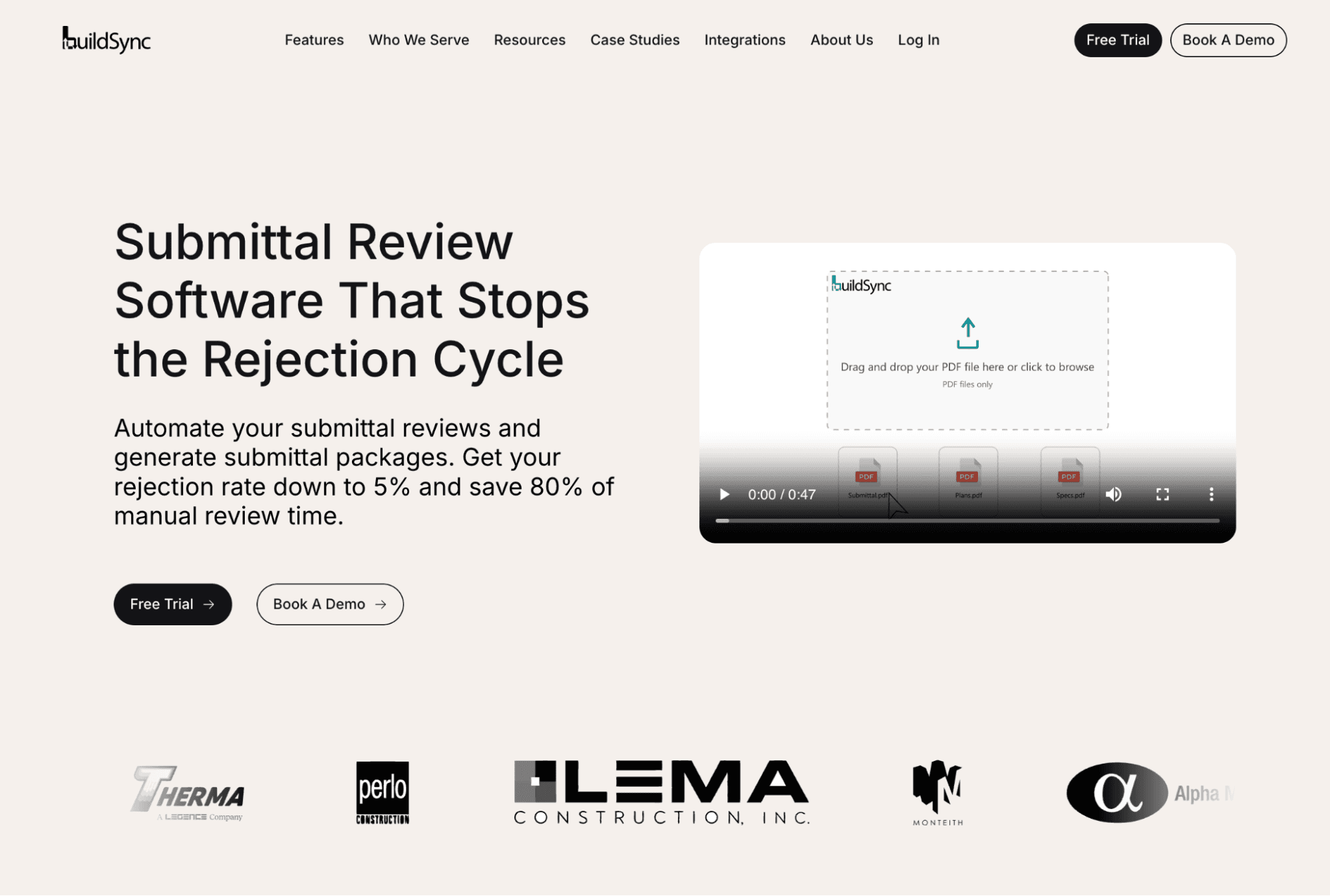
BuildSync is an AI platform built specifically to automate the technical side of construction submittals, covering both sides of the process. On the review side, rather than moving submittals through an approval workflow, BuildSync extracts every technical characteristic from a submittal, from dimensions and ratings to certifications and warranty terms, and checks each one against the project's plans and specifications.
On the package side, BuildSync's submittal package generation works in reverse for subcontractors: it reads the project specifications, pulls the matching requirements against a verified product database, and assembles a complete, compliant package before it ever goes out for review.
Best for: General contractors and MEP subcontractors on commercial projects who need submittals checked at the level of individual technical requirements, not just tracked through a workflow.
Key features
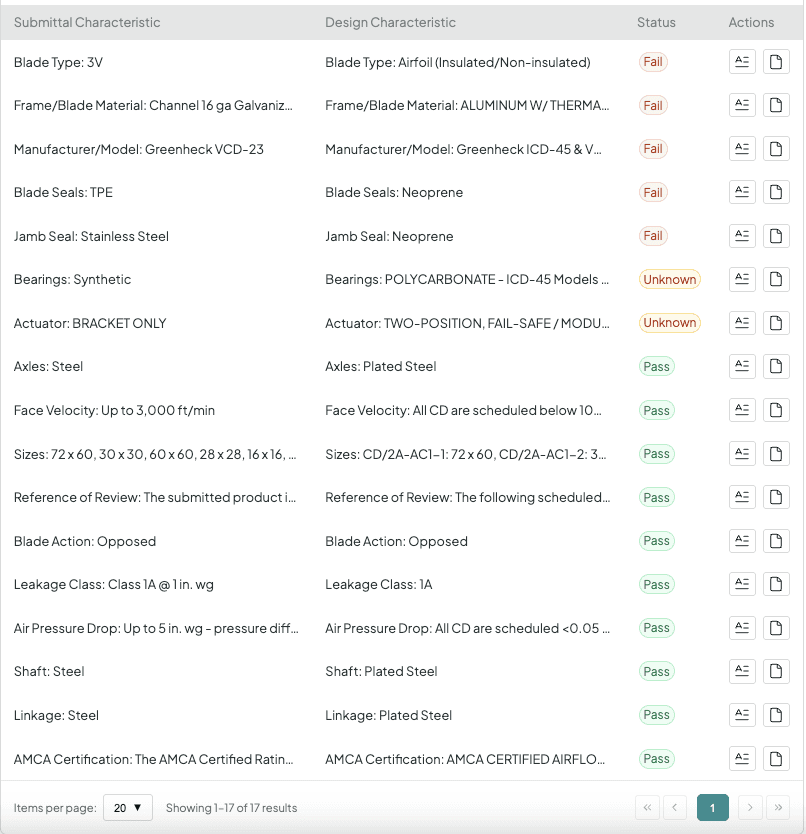
Characteristic-level extraction. A single air handling unit submittal can generate 50 or more individual technical characteristics for review, each checked separately against the spec.
Pass, fail, and unknown status. Every characteristic is marked compliant, non-compliant, or ambiguous, with a stated reason so a project engineer knows exactly what to verify.
Trust but verify. Every determination links back to the exact page in the original submittal and the exact spec section it was checked against, so the reviewer can confirm the AI's work in seconds instead of hunting through a 70-page document.
Zero-friction Procore integration. BuildSync operates as an actor inside existing Procore submittal workflows, so subs and GCs keep working the way they already do. The same extraction approach also powers BuildSync's submittal package generation, which reads a spec section and builds a compliant package from it, currently live for mechanical scopes with electrical rolling out next.
Integrations
BuildSync integrates with Procore, Trimble, and Autodesk Construction Cloud, with its Procore connection functioning as a two-way sync that pulls submittals in and pushes verified results back automatically.
Reviews/Case study
At Monteith Construction, a hospital renovation project, project manager Daniel Recktenwald reported reviews moving 70% faster after adopting BuildSync.
On a separate Monteith school project, project engineer Jacob Delargy used BuildSync to check a 530-page submittal against multiple specifications, work he noted he "would not have thought to reference during my own review process."
Pricing
BuildSync uses a custom-quote model rather than published rates.
When asked how a GC can distinguish an AI-powered workflow tool from a true technical analysis tool during a pilot, and what test reveals the difference, Tom Port, the co-founder of BuildSync, says:
"With the construction technology ecosystem expanding so quickly, GCs have more options than ever. There’s an old saying in software development: ‘When you lose focus, you lose results.’ It’s incredibly difficult for one platform to be great at everything.
At BuildSync, we’re laser-focused on delivering the best submittal review experience on the market. That’s why, during a pilot, I actively encourage our customers to give us their most technically complex submittals. Don’t give us the easy one, give us the 500-page submittal that your project engineer is dreading reviewing. That's how we build confidence.
I’d encourage GCs to apply the same principle when evaluating any construction software: identify the hardest real-world use case you expect it to solve, give it that problem during the pilot, and see how it performs."
Pros and Cons
Pros | Cons |
Extracts and checks individual technical characteristics rather than summarizing or routing documents. | BuildSync's core review capability is scoped to product data submittals; it does not prominently advertise shop drawing review at this time. |
Every determination is independently verifiable against source documents. | BuildSync is designed to prioritize accuracy over processing speed. Complex submittals spanning hundreds of pages may take multiple hours to analyze, as the platform performs a detailed, characteristic-level technical review rather than a surface-level document scan. |
Operates inside Procore with no workflow change required for subs or GCs. | |
Published, sourced case study results from named customers. |
Deep technical analysis and verifiability are BuildSync's clearest strengths, reflecting the platform's focus on characteristic-level compliance checking over broader workflow features.
Request a BuildSync demo to see how the technical characteristic breakdown works on one of your own submittals.
2. SmartPM: Best AI Platform for Construction Schedule Analytics
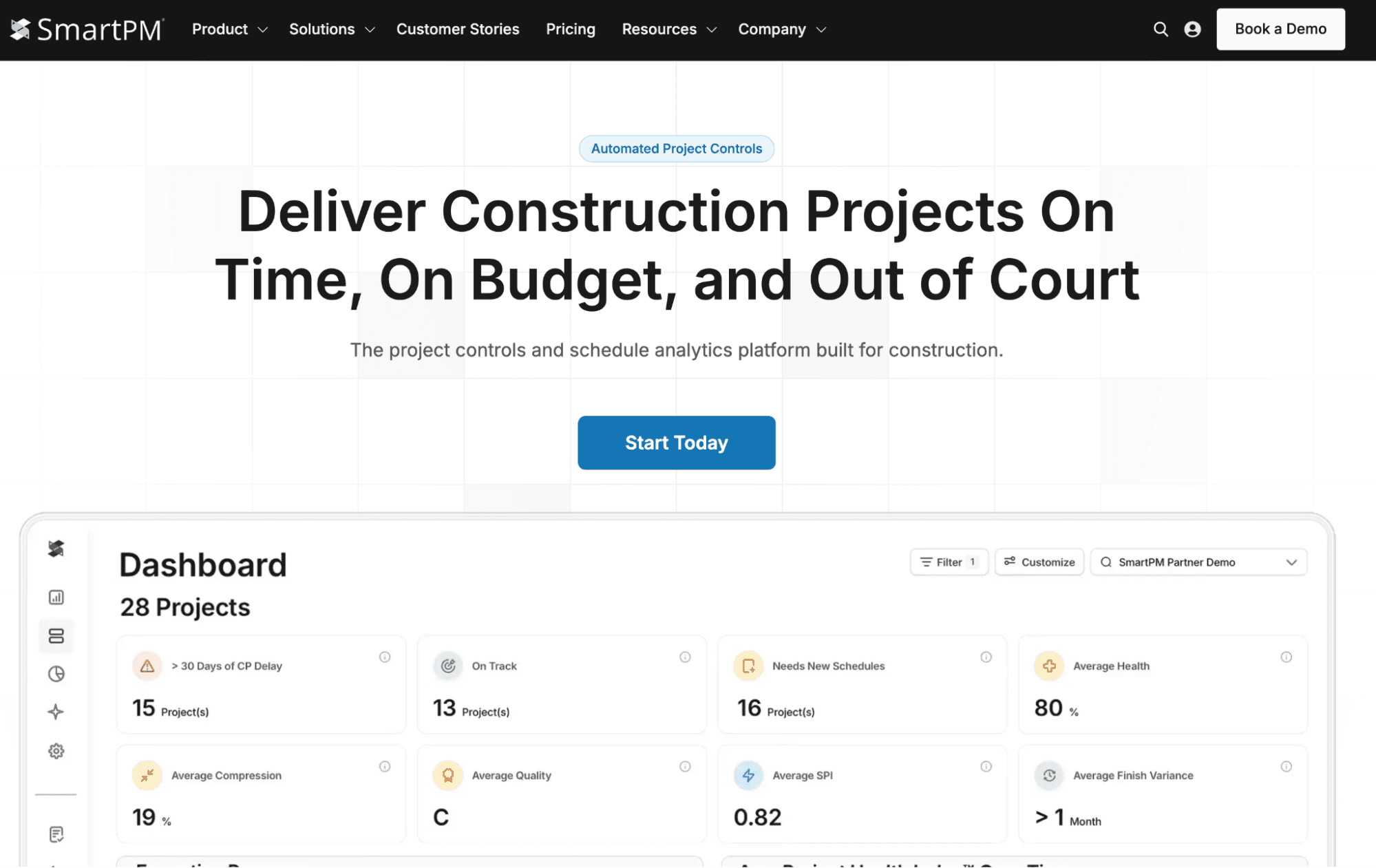
SmartPM turns static project schedules into a dynamic analytics engine that runs automated delay analysis on every schedule update. Rather than waiting for a monthly report, SmartPM's Automated Delay Analysis Engine compares each new schedule against the last one and identifies exactly what caused the end date to move.
Data point worth noting
SmartPM's 2026 State of Construction Scheduling report, based on more than 120,000 schedule files and roughly 10,000 survey responses, found that only 24% of general contractors said their schedules accurately reflect field conditions, and organizations using advanced schedule analytics reduced project delays by as much as 60%.
Scheduling risk and submittal risk often compound on the same project; a team already using BuildSync's drawing change detection to flag which submittals are affected by a revised drawing set has a natural complement in a tool like SmartPM that flags which schedule activities are affected by the same revision
Best for: Project managers and project controls teams managing multiple projects who need to catch schedule risk and cost overruns before they compound.
Key features
Automated delay analysis. SmartPM's Half-Step Delay Analysis breaks down day-by-day schedule impacts, separating delay, gains, and planned changes on the critical path.
Schedule quality scoring. The platform runs a custom analysis using more than 35 quality metrics on every schedule upload, going beyond the standard DCMA 14-point check.
Portfolio-level visibility. Dashboards show project health across multiple projects at once, which construction firms managing several job sites use to spot which projects need intervention first.
Integrations
SmartPM connects with Oracle P6, Microsoft Project, Procore, Autodesk, Egnyte, Power BI, Tableau, and Domo, and its Open API provides programmatic access to both raw schedule data and calculated metrics at no extra cost.
Reviews/Case Study
Capterra: 4.9 stars of 5 (46 ratings)
Seth J said: “My colleagues at Satterfield & Pontikes and I find SmartPM to be an invaluable tool, enabling us to proactively identify key drivers at earlier stages than previously achievable. Its efficacy as a risk mitigation tool has been substantiated through practical application.”
Pricing
Pricing: SmartPM publishes two tiers directly on its site: Essentials starts at $12,000 annually for up to 50 projects, and Controls starts at $25,000 annually for five "controls slots," with unlimited users included on both plans. Both come with a stated 60-day risk-free trial period.
Pros and Cons
Pros | Cons |
Automated delay analysis runs on every schedule update without manual setup. | Value is tied to schedule quality on the way in; the delay analysis is only as reliable as the CPM schedule data being fed into it, so teams with inconsistent scheduling practices will need to tighten that up to get full value. |
Backed by a large, first-party research data set on scheduling quality across the industry. | New users report a learning curve when first interpreting the delay analysis outputs. |
Integrates with existing scheduling tools including Oracle P6. |
3. Procore (AI Agents and Copilot): Best AI Platform for Unified Project Management

Procore has layered AI directly into its existing project management platform through three components: Procore Assist (a conversational assistant), Procore Agents (task automation), and Procore Insights (risk analysis). For construction firms already running Procore, this means AI features arrive inside the same system already managing RFIs, submittals, and daily logs.
Best for: General contractors already standardized on Procore who want AI features layered into existing PM, RFI, and submittal workflows rather than adopting a new platform.
Key features
Submittal Reviewer Agent. Reviews submittals against project specifications, generates review summaries, and flags discrepancies directly within the submittal record.
RFI Agent. Reviews RFIs for completeness and clarity and suggests edits before they go out.
Deep Search Agent. Searches specifications, drawings, and RFIs within Procore, compiling references and flagging conflicts with links back to source files.
Procore Insights. Benchmarks performance and flags project risk across submittals, RFIs, and daily logs using Procore's aggregate construction dataset.
For GCs weighing whether Procore's built-in review agents cover submittals deeply enough on their own, BuildSync's guide to improving the submittal review process walks through where workflow-level tools typically stop and where characteristic-level technical review picks up.
Integrations
Beyond its native AI agents, Procore maintains an app marketplace with more than 300 partners, including financial connectors for QuickBooks, Sage 300 CRE, and Sage Intacct, plus a direct integration with Oracle Primavera P6 for schedule data.
Pricing
Procore does not publish pricing publicly; it prices based on a customer's Annual Construction Volume rather than a flat per-user rate. Third-party estimates put small-contractor plans in the $4,500 to $10,000 per year range and mid-size to enterprise deployments well into five and six figures annually, though these figures are not confirmed by Procore itself.
Reviews/Case study
Capterra: 4.5 stars out of 5 (2,673 ratings)
Murtaza L. said: “Overall, my experience with Procore has been very positive. It provides a centralized platform for managing project documents, RFIs, submittals, and communication, which helps improve coordination and transparency across the project team.”
Pros and Cons
Pros | Cons |
AI features run inside the project management platform teams already use, avoiding a separate tool and login. | Procore's Submittal Reviewer Agent is one feature within a much broader platform; based on publicly available documentation, it is positioned around discrepancy flagging and review summaries rather than as a dedicated, standalone review product, so teams evaluating it should confirm current depth and accuracy directly with Procore. |
Broad coverage across RFIs, submittals, scheduling conflicts, and daily logs in one suite. | Full Agent rollout has been staged through 2025 and 2026, so not every feature referenced in Procore's announcements may be generally available at time of writing. |
Backed by a large existing construction dataset across Procore's customer base. |
4. Togal.AI: Best AI Platform for Takeoff and Cost Estimation

Togal.AI applies computer vision to architectural drawings to automate takeoff, the process of measuring and counting building elements to prepare a cost estimate. What used to take an estimator hours or days by hand, Togal.AI completes in minutes, detecting, measuring, labeling, and comparing spaces and features directly from the plans.
Best for: General contractors, estimators, and preconstruction teams who need faster, more consistent takeoffs to support bid preparation and resource allocation.
Key features
Automated detection and measurement. The platform's proprietary AI algorithm detects walls, rooms, doors, and other plan elements automatically, reportedly reaching up to 98% accuracy on floor plans.
TogalCHAT. An AI assistant that lets teams query plans and draft RFPs using natural language processing instead of manually searching drawing sets.
Compare Drawings. Automatically detects and highlights changes between drawing revisions, which helps prevent costly mistakes from a missed addendum.
Integrations
Togal.AI integrates with Service Titan, Ediphi, and Zebel, letting estimators pass takeoff quantities directly into downstream pricing tools.
Pricing
Togal.AI publishes its pricing, unlike most tools in this review. Its Growth plan runs $299 per user per month, billed yearly, with unlimited takeoffs, chat prompts, and collaboration. Teams of four or more users move to a custom-quoted Business plan that adds SSO, security compliance, and quantity discounts.
Reviews/Case study
G2: 4.8 stars out of 5 (60 ratings)
Chris V said: “I use Togal.AI for flooring takeoffs and ordering amounts. I appreciate its ability to provide quick turnarounds and accurate quantities. I like its organization and speed. The auto takeoff is great and works so well, making it easier to do many takeoffs in a short period of time. Togal.AI uses better tech and is way easier, and the initial setup was very easy as I jumped right in. I find it so effective that I would rate it a 10 out of 10 for recommending to others.”
Pros and Cons
Pros | Cons |
Meaningfully faster than manual takeoff for standard building elements. | Pricing scales per user, which construction firms evaluating for larger estimating teams should factor into total cost. |
Natural language plan search reduces time spent hunting through drawing sets. | |
Supports most common drawing file formats. |
5. OpenSpace: Best AI Platform for Jobsite Documentation
OpenSpace is a software platform that automates visual documentation of a job site using a proprietary Spatial AI engine. A field team member mounts a supported 360-degree camera to a hard hat and walks the site; OpenSpace's software then automatically maps every captured image to the project's floor plan, no manual tagging required.
Best for: General contractors and owners who need a searchable visual record of site progress across multiple projects, especially for remote monitoring and progress verification on high value projects where stakeholders cannot walk the site themselves every week.
Key features
Automated 360-degree capture. OpenSpace's Vision Engine maps 360-degree video to floor plans automatically as a team member walks the site.
OpenSpace Air. A drone-agnostic mapping add-on, compatible with DJI, Skydio, and other drones, that turns aerial imagery into orthomosaics, point clouds, 3D meshes, and elevation models inside the same platform as the 360° ground-level captures.
BIM overlay comparison. Overlays BIM models on captured imagery to verify installations match design intent and catch clashes before they turn into rework.
AI Voice Notes. Field teams can log an issue by speaking, and the AI logs it into a Field Note with the right fields, such as assignee and due date, filled automatically.
Integrations
OpenSpace integrates with Procore, Autodesk Construction Cloud, and Revizto, with BIM model overlays available wherever a connected platform supplies the model.
Pricing
OpenSpace publishes its pricing structure, though not fixed dollar amounts: cost is based on a percentage of a project's construction volume.
Reviews/Case Study
Novo Construction reports capturing a complete jobsite record 95% faster than manual documentation processes, according to OpenSpace's published case study, and builders using the platform describe it as a way to improve client communication because owners can review real time insights on their own project without waiting for a scheduled site visit.
Pros and Cons
Pros | Cons |
Removes most manual effort from jobsite photo documentation. | Output quality depends on what the camera actually sees; a poorly lit area, an obstructed angle, or a section of the site skipped on a walk won't get flagged the way a missing document would in a checklist-based system. |
Strong integration ecosystem, including Procore, Autodesk Construction Cloud, and Revizto. | Value depends on consistent site walks; documentation quality declines if capture cadence is inconsistent. |
SOC 2 certified with FedRAMP Moderate Authorization for security-sensitive projects. |
6. Autodesk Construction IQ (Forma): Best AI Platform for Predictive Risk Scoring
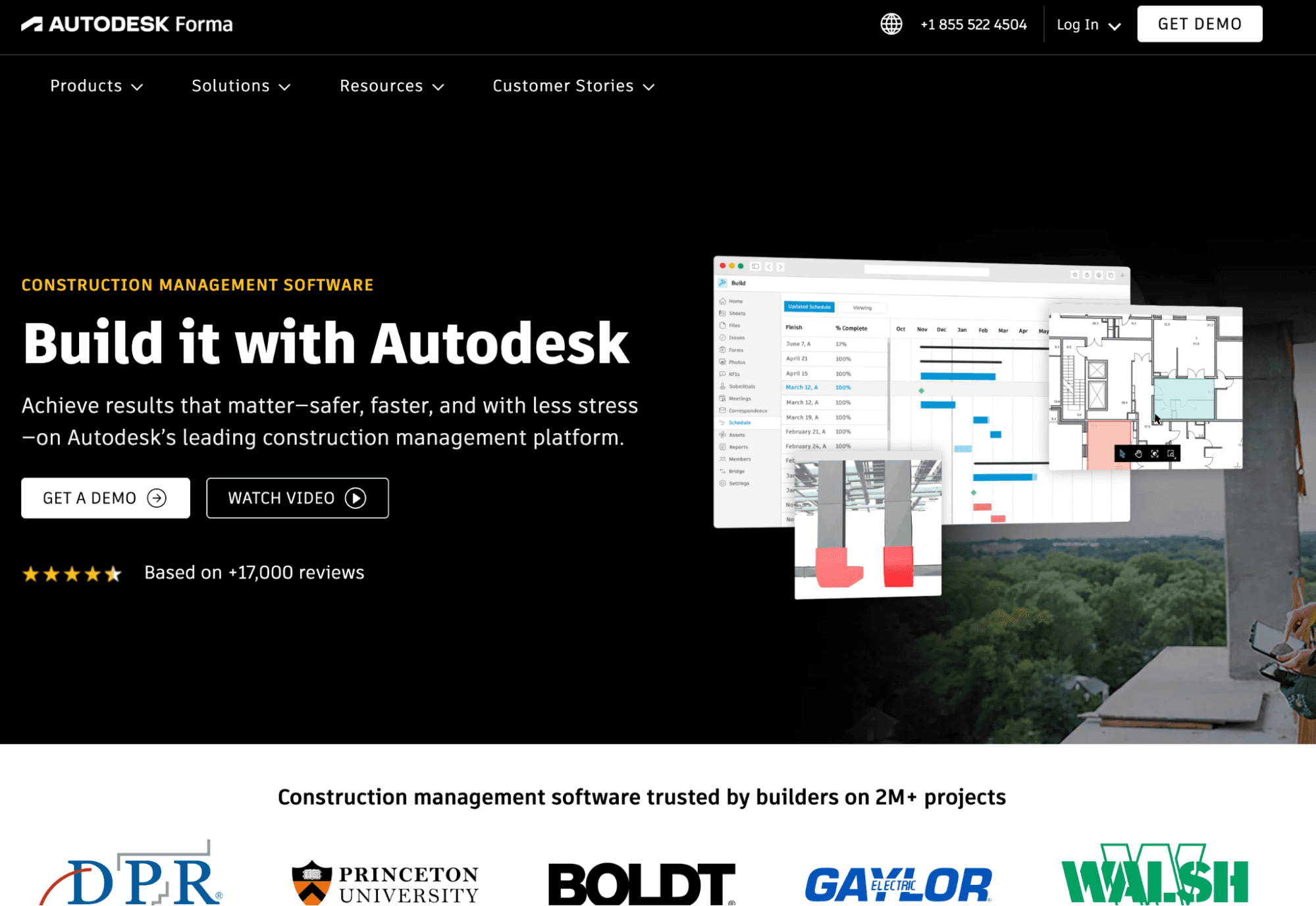
Construction IQ, part of Autodesk Forma, applies machine learning to a project's existing issues, RFIs, and checklists to identify and prioritize risk across design, quality, safety, and project management categories before problems become expensive.
Data point worth noting
Autodesk states Construction IQ has been trusted more than 5 million times in the past year, and research presented at Autodesk University found that more than half of RFIs have a root cause in design issues or documentation errors that improved design review could catch earlier.
That statistic points to the same upstream problem BuildSync's submittal package generation is built to reduce on the subcontractor side: fewer documentation errors going in means fewer RFIs and rejections coming back.
Best for: Superintendents, project managers, and VDC managers on high-value projects who need an early warning system pulled from data already being entered into Autodesk Construction Cloud.
Key features
RFI Risk Factors. Identifies which RFIs pose the greatest risk to cost and schedule and classifies them by root cause, discipline, and building component.
Design, Quality, and Safety Risk Factors. Surfaces high-risk items across each category so project leaders can act daily instead of discovering problems at the next scheduled review.
Autodesk Assistant. A conversational AI layer that pulls from specifications, issues, and RFIs to answer questions and generate project health dashboards on demand.
Integrations
As part of Autodesk Construction Cloud, Construction IQ inherits native connections to Revit, AutoCAD, and BIM Collaborate, plus API-based integrations with Procore, Power BI, Sage, QuickBooks, and CMiC.
Pricing
Construction IQ itself has no separate published price; it is bundled into Autodesk's broader Forma platform. Entry tiers for the underlying Autodesk Construction Cloud products start around $500 per year for basic document access, scaling up substantially for full Autodesk Build access.
Reviews/Case study
Capterra: 4.3 stars out of 5 (2,210 reviews)
Jasmin M said: “Overall, my experience with Autodesk Construction Cloud has been positive. It centralizes project data, making collaboration and communication seamless across teams. The platform’s real-time updates and analytics help reduce errors, improve efficiency, and give clear visibility into project progress. The only drawback I experienced was occasional poor customer service, which made resolving issues slower than expected.”
Pros and Cons
Pros | Cons |
Draws directly on data already being entered into Autodesk Construction Cloud, so there is minimal duplicate data entry. | Risk scores are only as good as the underlying issue and RFI data quality; a team that logs items inconsistently or with vague descriptions will get less useful prioritization out of the tool, regardless of how well the model itself performs. |
Strong adoption and a large volume of aggregate usage data. | Primarily oriented toward risk prioritization and pattern detection rather than characteristic-level technical compliance verification against written specifications. |
Covers risk across four categories (design, quality, safety, project controls) in one tool. |
7. Trunk Tools: Best AI Platform for Field Document Search

Trunk Tools focuses on making construction project documents searchable and usable during execution. Its TrunkText tool lets field and office teams ask plain-language questions across specs, drawings, RFIs, submittals, and contracts, with answers citing the exact source document.
Best for: Field teams and general contractors managing large volumes of project documents who need fast, cited answers without manually searching PDFs.
Key features
TrunkText. Natural language document search across specs, drawings, submittals, contracts, and RFIs, with responses citing the source document and section.
TrunkRFI. Flags when an RFI's answer already exists in project documents or a prior RFI response, aiming to reduce unnecessary RFIs.
TrunkSubmittal. Compares subcontractor submittals against project specifications and related documents, surfacing discrepancies according to Trunk Tools' own product materials.
Integrations
Trunk Tools syncs with Procore, Autodesk Forma/Build, SharePoint, Box, Dropbox, Egnyte, InEight, CMiC, and Oracle Primavera Cloud, pulling specs, RFIs, submittals, and drawings from whichever of these systems already holds a project's documents.
Pricing
Trunk Tools does not publish pricing anywhere; multiple software directories confirm it is custom-quote only, with no published starting price.
Reviews/Case study
Trunk Tools has publicized a case study with general contractor Torcon, which reportedly used the platform to complete 64 submittal reviews over four months, with reported time savings across separate published accounts ranging from roughly 47 to more than 450 hours. Given that range, readers should confirm the current figures directly with Trunk Tools rather than treat either number as settled.
Pros and Cons
Pros | Cons |
Fast, cited document search reduces time spent hunting through PDFs during execution. | Trunk Tools' public materials describe TrunkSubmittal as identifying discrepancies at the document and RFI cross-reference level; the depth of technical verification behind that process isn't fully detailed in public materials, so teams evaluating it for submittal review should confirm current capabilities directly with the vendor. |
Field access through SMS and Microsoft Teams supports adoption among crews who are not at a desk. | Historically positioned toward large ENR-ranked contractors, so smaller construction firms should confirm current pricing and deployment fit directly with Trunk Tools. |
Deployed across hundreds of jobsites, primarily with larger general contractors. |
What "AI Construction Tools" Actually Cover in the Construction Industry
The phrase covers a wider range of software than most searches assume, which is exactly why comparing tools without a shared framework produces confusing results.
A construction firm searching for an AI platform to solve one problem, like cost estimation, will land on results built for an entirely different job, like site monitoring or scheduling. All of it gets marketed under the same "AI construction tools" umbrella, which makes the category noisy for any business trying to evaluate options with limited time.
Most of that umbrella breaks down into three underlying technologies:
Computer vision lets software "read" a photo or drawing, the way it spots a wall on a floor plan or tags a hazard in a jobsite photo.
Machine learning finds patterns across large volumes of project data, which is how a tool learns to flag a likely schedule delay or a high-risk RFI before a person would catch it.
Natural language processing lets a person ask a plain-language question, like "what's the warranty requirement on this unit," and get an answer pulled from a spec or submittal instead of searching a PDF by hand.
Nearly every tool in this review runs on some combination of the three.
The Functional Categories in This Review
Technical compliance and document verification. Tools that extract data from a document (a submittal, a spec, a drawing) and check it against a requirement. BuildSync and, to a more limited extent based on public documentation, Trunk Tools' TrunkSubmittal and Procore's Submittal Reviewer Agent operate here.
Schedule and risk analytics. Tools that ingest project data (schedules, RFIs, issues) and use machine learning to score risk or predict delay. SmartPM and Autodesk Construction IQ operate here.
Takeoff and cost estimation. Tools that use computer vision to measure and quantify building elements from drawings. Togal.AI operates here.
Site monitoring and documentation. Tools that capture and organize visual data from the physical job site. OpenSpace operates here.
Unified project management with embedded AI. Platforms like Procore that layer AI agents on top of an existing, broad project management system covering RFIs, submittals, scheduling, and daily logs.
Document search and retrieval. Tools focused on making existing project documents fast to search using natural language processing, without necessarily verifying compliance against a requirement. Trunk Tools' TrunkText is the clearest example.
None of these categories fully substitute for another. A team evaluating AI tools for construction project management should first identify which of these six jobs they are actually trying to solve, since the tool that wins a bake-off for takeoff speed is rarely the same tool that will catch a compliance issue buried on page 47 of a submittal.
Why the Stakes Are Higher in 2026
Construction margins are tight, and the cost of a missed detail has not gotten smaller. BuildSync's survey of more than 6,000 construction professionals found that a rejected submittal costs an average of $805 once labor hours, coordination time, and downstream schedule effects are counted, and that figure only reflects one narrow failure point in the broader project documentation process.
At the same time, the volume of project data flowing through a typical job has grown. Specifications run hundreds of pages. Schedules update weekly. A single high-value project can generate thousands of submittals, RFIs, and site photos, and reviewing all of that volume manually while still cutting costs and creating fewer errors was already difficult before that volume increased.
It is not realistic now, especially as construction firms continue navigating labor shortages that leave fewer hands available for manual document review in the first place. The math on project costs makes the case on its own: saving time on manual review is not just a convenience, it shows up directly on the bottom line.
When asked what changed between 2024 and today that made construction AI adoption accelerate despite the industry's early skepticism, Tom Port, the co-founder of BuildSync, says:
“Construction is an industry built on proven results, not chasing the latest idea. In 2024, there simply wasn’t enough evidence that AI could meaningfully impact real construction use cases. Today, that’s changed. Contractors are running pilots and seeing measurable time savings, using AI as a force multiplier to get more done with the same resources, which is particularly valuable given the talent shortages across the industry.”
This is also why the framing matters. AI agents that automate a task without checking its substance can boost efficiency on paper while quietly letting errors through, and those errors eventually surface as budget overruns, safety checks that got skipped, or a client relationship strained by a preventable delay.
The tools worth adopting in 2026 are the ones that can show their work: where a number came from, what it was checked against, and why a result came back the way it did.
What to Look For When Evaluating AI Construction Management Software
Not every construction management platform needs every capability below. The right feature set depends on which of the six functional categories above matches the job you are hiring the software to do.
Feature Category | Why It Matters | What to Look For |
Depth of extraction | Determines whether the tool checks substance or just moves documents | Characteristic-level or line-item data extraction, not summary-only output |
Source verifiability | Builds trust and lets a human catch AI error | Click-through to the original document and requirement for every finding |
System integration | Determines whether adoption requires a new workflow | Native integration with Procore, Autodesk Construction Cloud, or existing scheduling tools |
Output usability | Determines whether results reach the people who need them | Exportable reports, marked-up documents, or dashboards stakeholders can act on directly |
Data requirements | Determines how much setup and ongoing input the tool needs | Clear documentation of what data the AI needs and how consistently a team must provide it |
Pricing clarity | Reduces total cost of ownership surprises | Published pricing structure or a documented cost calculation, not "contact sales" only |
The Feature That Matters Most: Verifiability
Every other feature on this list matters less if a team cannot check the AI's work. A tool that produces a confident answer with no way to trace it back to a source document asks the reviewer to trust it blindly, which runs directly against how experienced construction professionals are trained to operate. T
The tools that earn adoption fastest are the ones that show, not just tell: here is the exact page, here is the exact requirement, you make the final call. That verification step is also what actually drives fewer errors downstream, since catching a mismatched spec at the review stage costs a few minutes, while catching it after installation costs a change order.
Final Thoughts
There's no single best AI construction tool for every firm. The right answer depends on the job: checking technical compliance on a submittal is a different task from forecasting a delay or documenting a job site, and the tool that helps most is the one built for that specific kind of data, not the one with the flashiest demo.
What separates a tool worth adopting from one that just adds another dashboard is verifiability. Construction professionals who've learned to trust but verify their own work won't blindly trust a black box, and they shouldn't have to. The tools that show their work, down to a specific page or requirement, are the ones earning real adoption in 2026.
Book a demo to see how BuildSync's characteristic-level review works against your own project's submittals, or reach out to discuss where AI fits into your current workflow.
Frequently Asked Questions
Do AI construction tools replace the need for a construction project manager?
No AI construction tool reviewed here replaces a project manager's judgment. Each tool automates a specific, time-consuming task, extraction, analysis, search, or capture, so the PM or PE can focus on decisions and coordination instead of manual data entry. The final call on compliance, risk, or scope remains with the human reviewer in every platform covered above.
How long does it typically take to implement an AI construction tool?
Is data security a concern with AI construction tools?
Is AI construction software worth the cost for smaller general contractors and subcontractors?
Related reads for you
Discover more articles that align with your interests and keep exploring.


