Construction Technology & Innovation
/
Apr 21, 2026
Free Construction Submittal Review Template [With Instructions]
Download our free construction submittal review template. Includes step-by-step instructions to help PMs and PEs catch non-compliant submittals before they reach the design team.


The construction submittal review template is on the desk. The spec binder is open. The project engineer works through the form, checks the obvious fields, and moves on.
Two weeks later, the submittal comes back rejected. Light transmittance was off-spec. It was on the template. It just did not get checked with any depth, because the submittal was 70 pages, the construction project was in full startup chaos, and that one data point was buried on page 43 of the product data sheet.
This is not a template problem. It is an execution problem. And it happens on construction submittals every single day across the industry, contributing to rejection rates that routinely sit at 35% or higher. The template did not fail. The conditions under which the submittal review process happened did.
This article gives you a complete construction submittal review template with instructions on how to use it at the depth the spec demands, where the submittal process most commonly breaks down, and what to do when your review turns up conflicts, unknowns, or outright failures.
What is a construction submittal review template (and what it is not)
A construction submittal review template is the structured form a general contractor or project manager uses to document compliance findings before transmitting a submittal to the design team. It records, per product and per technical characteristic, whether proposed materials and equipment meet project specifications, and it creates the paper trail that supports the approval process.
It is not the same as a submittal log template, which tracks submittal status across the entire project from initial submission to final approval. And it is not the same as a submittal review checklist, which tells reviewers what categories to look for. The review template is the working document that captures what was actually found during the review of a specific submittal.
The distinction matters because each document serves a different stage of the submittal process. The construction submittal review checklist tells you what to look for. The submittal log tells you where every submittal stands. The review template records what you found.
Submittal type also affects how the template gets used. Product data reviews require a technical characteristics table, working through dimensions, ratings, and certifications against the spec line by line. Shop drawings require closer attention to fabrication details and coordination with other trades. Material samples require documentation of physical samples reviewed and their approval status. A single generic template rarely handles all three equally well, which is worth knowing before you build one.
What a construction submittal review template should include
A complete template covers six areas. Teams that shortcut any of them tend to find that the rejections cluster exactly around what was skipped.
Template section | What to include | Why it matters |
Project identification | Project name, number, spec section, current revision / addenda | Submittal built on superseded documents triggers automatic rejection |
Submittal register entry | Submittal number, submittal items covered, submittal type (product data, shop drawings, material samples) | Ensures every item in the submittal register is accounted for |
Contractor review stamp | Reviewer name, signature, date, and "approved by GC" notation | Required under AIA A201 §3.12.5 before transmittal to the design team |
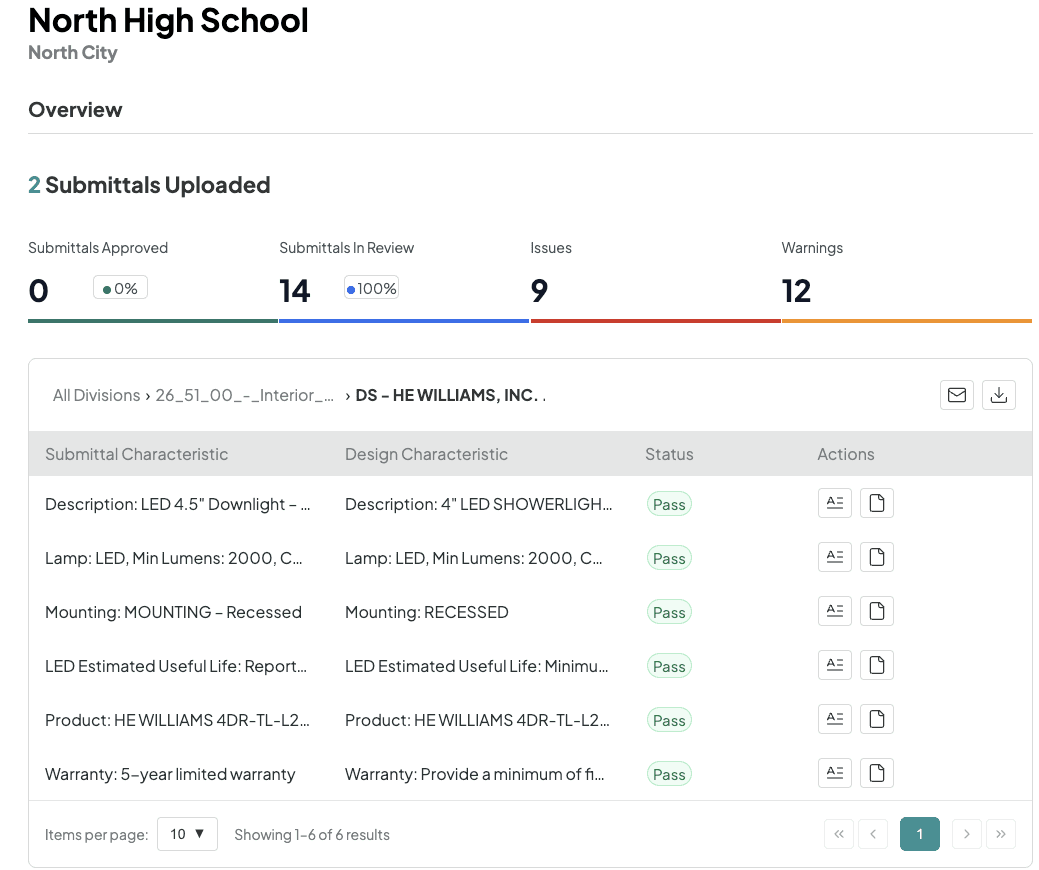
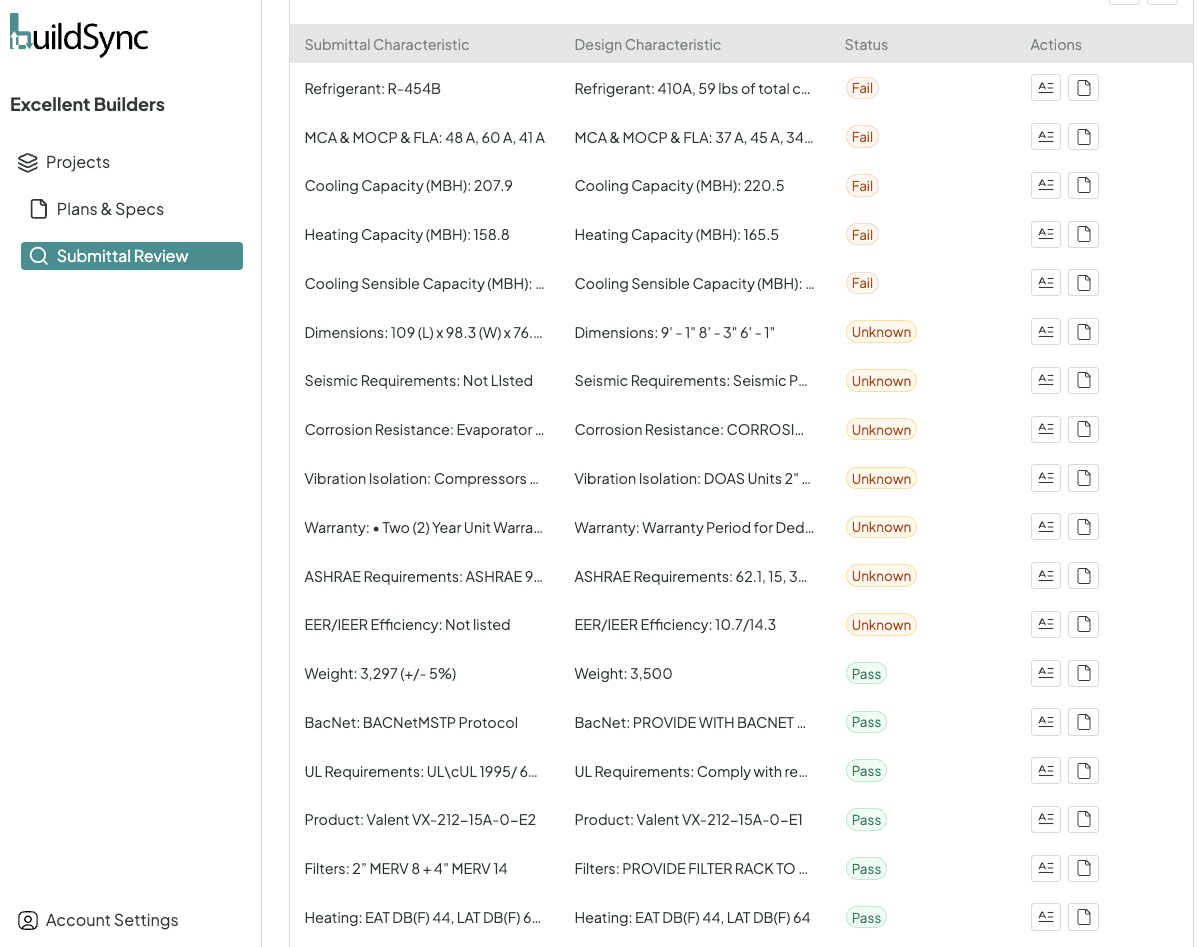
Technical characteristics table | Submittal value vs. spec requirement vs. status (pass / fail / unknown) per characteristic | The core of the template; where most rejections are caught or missed |
Reviewer notes and action items | Unknown fields flagged with specific questions for the sub; failures documented with the exact spec reference | Unknowns left blank become rejections; documented unknowns become conversations |
Transmittal fields and approval status | Transmittal date, recipient, current approval status, resubmittal number if applicable | Creates the paper trail and real-time tracking record for the submittal schedule |
The technical characteristics table deserves particular attention because it is where most rejections either get caught or slip through. Every row should capture the submittal value (what the product data sheet says), the design value (what the project specifications require), and a clear status. Rather than a sign of failure, unknown fields are action items, and they should be documented explicitly rather than left blank.
Download the free BuildSync construction submittal review template.
How to use a construction submittal review template: step by step
Having the template is the easy part. Using it at the technical depth the construction submittal process demands is where most teams struggle under real project conditions. Two habits separate a review that catches problems from one that just fills out the form.
Read the spec section before you open the submittal
Most reviewers open the product data first and then check it against the spec. This is backwards. Pull the relevant spec section, work through every technical requirement listed there, and pre-populate the design value column of your template before the submittal is in front of you. This maps the entire technical characteristics table in advance and makes it much harder to miss a requirement buried deep in the spec.
For a Division 23 HVAC unit, that means identifying every performance requirement in the section: capacity, efficiency ratings, refrigerant type, coil coatings, sound ratings, electrical data, spare parts requirements.
For lighting, it means pulling the luminaire schedule and flagging the lens type, photometric requirements, and control compatibility before opening a single cut sheet. This pre-review step is the single highest-leverage change a project team can make to their construction submittal review process, and most teams skip it entirely.
It's also the first habit teams build when they want to review submittals faster, because it turns an open-ended read into a checklist with a known length.
Work by product, not by page
A submittal package for a single piece of equipment can run 40 to 70 pages, with product data, certifications, installation instructions, and warranty documentation mixed together. Reviewing page by page leads to missed characteristics.
Work by product instead: identify every product or piece of equipment in the submittal, complete the full technical characteristics table for each one before moving to the next, and document every unknown as a specific question rather than a blank field.
Blank unknowns are expensive. A reviewer who skips an ambiguous field rarely comes back to it. That ambiguity either gets flagged by the design team at a cost of two or more weeks, or it makes it through to installation where the cost of correction is far higher. Document every unknown as a specific question for the sub. Unknown fields left blank become project delays.
Where construction submittal reviews break down, even with a template
Three failure modes account for the majority of submittal rejections on commercial construction projects, and all three operate independently of whether a team has a good template.
Time pressure
Most construction projects hit their highest submittal volume in the first three to six months, exactly when startup chaos is at its peak. Project managers are juggling RFIs, schedule updates, subcontractor coordination, and procurement. The submittal review process competes for attention with everything else happening at once, and the technical characteristics table is usually what gets shortchanged.
The experience gap
For project engineers earlier in their careers, knowing which characteristics carry the most risk on a specific submittal type is not instinctive. It takes experience to know that a corrosion-resistant coating requirement means something very different on a coastal healthcare project than on an inland office building, or that a refrigerant type substitution is never minor. The template provides structure, but it does not supply that judgment.
How teams handle unknown fields
When a reviewer cannot make a compliance determination from the product data alone, the right response is to document the specific reason and contact the sub before transmitting. The common response is to skip the field and move on. Those skipped unknowns are disproportionately responsible for the costly rework and resubmission cycles that slow projects down.
"Before BuildSync we were moving through submittals like quicksand, often overwhelmed and missing problems. After BuildSync, submittals have become something that is part of your day and not your whole week." — Daniel Recktenwald, PM, Monteith Construction.
Tom Port, the co-founder of BuildSync, when asked which specific section of a submittal review template gets skimmed most under real project pressure, and what should PMs do differently to prevent it from becoming the source of their next rejection says:
What gets skimmed isn’t the form, it’s the depth. The technical characteristics table looks complete, but the hard comparisons don’t actually happen.
The teams that avoid rejections are the ones who slow the process down just enough to make every requirement explicit before they even open the submittal.
The template fields that cause the most rejections
Not all sections of a review template carry equal risk. Three areas account for a disproportionate share of submittal rejections.
The technical characteristics table
The technical characteristics table is where the most costly errors live, particularly on complex MEP equipment. A refrigerant type substitution that looks minor on a quick scan can be a flat-out spec violation.
A light transmittance value at 33% against a spec minimum of 42% is an outright failure. A coating type that does not address the specific corrosion environment in the spec is an unknown that should never be transmitted as a pass.
These are the routine technical details that get missed when project teams review submittals quickly rather than thoroughly.
Approved manufacturer verification
The wrong manufacturer is an automatic rejection regardless of how well every other characteristic checks out. Verify this first, because if the manufacturer is not on the approved list, the rest of the review is moot until a substitution request is in place.
Closeout and attic stock
Spare parts, filters, and fan belts are specified in the project specifications and need to be documented on the submittal. Easy to miss on a quick review. Expensive to dispute at project closeout when retention is on the line.
"BuildSync has helped us review multiple submittals against multiple specs that I would not have thought to reference during my own review process." — Jacob Delargy, PE, Monteith Construction
How to conduct an effective construction submittal review
An effective construction submittal review follows a defined sequence rather than working through the submittal document page by page.
Read the spec section first
Build out the design value column of the template before touching the product data, then work through each product in the submittal systematically, characteristic by characteristic.
Document every unknown explicitly
An unknown field with a clear reason ("warranty period not stated on product data, spec requires 10 years from substantial completion") is not a failure. It is a specific question that can be answered with a phone call to the sub. An undocumented unknown is a liability that gets discovered later at a much higher cost.
Apply the contractor review stamp only after the review is complete, not before
Under AIA A201 §3.12.5, the act of submitting a submittal is a representation to the owner and architect that the general contractor has reviewed and approved it. Rubber-stamping and forwarding without completing the review is a contractual obligation not met, and it transfers risk to the GC for errors the design team later catches.
Communicate with subcontractors before transmittal, not after
Identifying a failed characteristic or an unanswered unknown at the GC review stage costs a phone call. Identifying it after the design team returns the submittal costs two weeks.
Tom Port, the co-founder of BuildSync, when asked how experienced project managers approach a template-based submittal review differently from junior project engineers, and what specific habits or approaches separate a thorough review from one that just gets the form filled out, says:
The best PMs don’t rush to fill the template out; they slow down just enough to think through the spec first. They know where the risk sits, they document every unknown, and they don’t transmit anything they wouldn’t stand behind. That’s the difference between a review that catches issues and one that just moves the process along.
What to do when your review template flags a conflict or unknown
Three situations come up regularly in the construction submittal review process that the template alone cannot resolve.
Conflicting plans and specifications
Apply the more stringent requirement and write an RFI asking the design team for clarification. Document both the submittal value and both conflicting requirements in the template notes so the design team has complete context when they respond. Do not hold the submittal waiting for RFI resolution if it can be transmitted with the more stringent standard applied. Getting on the same page early prevents dispute resolution conversations later.
An unknown the product data does not resolve
Contact the sub before transmitting. A simple message with the exact characteristic in question, the spec requirement, and a request for clarification or supplemental documentation turns an unknown into a resolved item or a targeted resubmittal. Transmitting with unresolved unknowns shifts the discovery cost to the design team and adds two weeks to the approval process when they send it back.
An outright failure
Give the sub a specific target for resubmission. Citing the characteristic, the submittal value, and the exact spec requirement leaves no ambiguity about what needs to change. Specific feedback at this stage is what keeps the process moving and prevents the same failure from appearing on a second submittal.
When a construction submittal review template is not enough
A template structures the construction submittal review process. On smaller construction projects with a manageable submittal volume and experienced reviewers, a well-built template is often sufficient to get the construction submittal review process to a reliable standard. But template-based manual review has a ceiling, and most commercial construction projects hit it.
A complex mechanical unit like an AHU can carry 60 or more individual technical characteristics. That is 60 discrete comparisons between the product data and the project specifications, all of which need to be documented accurately. Under real project conditions, with a project team handling multiple concurrent submittals, that level of depth is difficult to sustain consistently.
The experience gap compounds the problem. Junior project engineers reviewing complex Division 23 or Division 26 submittals may not know which characteristics to prioritize or where the relevant requirements sit in a 200-page specification document. The template provides structure. It does not supply the technical knowledge to fill it out correctly.
This is where AI-powered submittal review changes the equation for construction teams. BuildSync does not replace the template or the reviewer. It handles the extraction and comparison work, pulling every technical characteristic from the product data, mapping each one against the relevant project requirements, and returning a detailed report showing what passes, what fails, and what is unknown. The reviewer makes the final call. What changes is the depth and consistency of the review, and the time required to get there.
See how BuildSync works with your submittal review process. Book a demo.
Frequently asked questions
Can one review template work for all submittal types, or do you need separate templates per trade?
One template can cover multiple submittal types if it is built with flexible sections like the our template, but in practice most construction submittals benefit from trade-specific versions. Product data reviews for mechanical equipment require a much more detailed technical characteristics table than material samples or shop drawings. A lighting fixture submittal has a different set of critical characteristics than an AHU submittal. The core structure can stay consistent across all three (project identification, contractor stamp, characteristics table, reviewer notes, transmittal fields) while the characteristics section is pre-populated differently for each trade. Teams that standardize a single universal template often find it works well for straightforward submittals and falls short on complex MEP equipment, which is where most rejections happen.
What is the difference between a construction submittal review template and a submittal log template?
Related reads for you
Discover more articles that align with your interests and keep exploring.


