Construction Technology & Innovation
/
Mar 9, 2026
MasterFormat Divisions: Quick Reference for Contractors
Quick guide to CSI MasterFormat divisions. Understand spec organization, division structure, and how to navigate construction specifications efficiently.


The CSI MasterFormat divisions are the organizational backbone of every commercial project's construction specifications - and yet most contractors interact with them daily without fully understanding how this standardized system works, or how much that gap costs them.
From bid prep to submittal review, the way a project's specs are structured by division directly affects how smoothly the job runs. This quick reference breaks down the system the way field teams actually need it: clearly, practically, and with a focus on what matters most on live construction projects.
What Are CSI MasterFormat Divisions?
CSI MasterFormat divisions are a standardized system for organizing construction information - a numbering system published by the Construction Specifications Institute (CSI) that categorizes all written information for building projects into a consistent, hierarchical framework. Think of it as the Dewey Decimal System of construction documentation: every product, material, system, and work result gets a defined home, and anyone on the project team can find it fast.
The Construction Specifications Institute introduced the first version in 1963, publishing a 16-division format for organizing specifications across construction projects. In 2004, as the construction industry grew more complex and new building systems demanded more detailed information and granular spec coverage, the system expanded to 50 divisions - the version in use today across North America. The latest edition was released in 2018. Some older projects and bid forms still reference the legacy 16-division structure, so it's worth knowing both exist.
The practical payoff: when a PM says "Division 23," every GC, sub, and architect on the project immediately knows they're talking about HVAC. That shared language - built into the organizational structure of every project spec book - eliminates the miscommunication that derails construction projects and creates costly documentation gaps.
The 50 MasterFormat Divisions at a Glance
The 50 divisions are organized into five major subgroups, each covering specific categories of construction work. Here's the full reference:
00 Procurement and Contracting Requirements
Division | Title |
00 | Procurement and Contracting Requirements |
General Requirements
Division | Title |
01 | General Requirements |
Facility Construction (Divisions 02–19)
Division | Title |
02 | Existing Conditions |
03 | Concrete |
04 | Masonry |
05 | Metals |
06 | Wood, Plastics & Composites |
07 | Thermal and Moisture Protection |
08 | Openings (Doors, windows, glazing) |
09 | Finishes |
10 | Specialties |
11 | Equipment |
12 | Furnishings |
13 | Special Construction |
14 | Conveying Equipment |
15–19 | Reserved (for future expansion) |
Facility Services (Divisions 20–29)
Division | Title |
21 | Fire Suppression |
22 | Plumbing |
23 | HVAC |
24 | Reserved |
25 | Integrated Automation |
26 | Electrical |
27 | Communications |
28 | Electronic Safety & Security |
29 | Reserved |
Site and Infrastructure (Divisions 30–49)
Division | Title |
31 | Earthwork |
32 | Exterior Improvements |
33 | Utilities |
34 | Transportation |
35 | Waterway & Marine Construction |
36–39 | Reserved |
40–49 | Process Equipment |
Several divisions remain reserved for future expansion - a deliberate design choice that gives this standardized framework room to grow as technology evolves without requiring a complete overhaul.
Which MasterFormat Divisions Matter Most for Submittal Reviews?
Not all 50 divisions carry equal weight when it comes to submittal volume and complexity. For most commercial GCs and MEP subcontractors, the real action happens in a specific set of divisions - and understanding which ones generate the most friction is where spec knowledge starts paying off on construction projects.
Divisions 21, 22, 23, 26, 27, and 28 - the facility services group - consistently produce the most technically complex submittals. A single Division 23 air handling unit submittal can run 70 pages, with 60 or more individual technical characteristics requiring verification against project specs.
Division 26 electrical submittals, particularly for lighting fixtures, are notorious for having dozens of variants within a single package, where one product data sheet might cover 15 different fixture types. Building a repeatable process for reviewing electrical submittals at that scale requires knowing which data points cause the most rejections and checking them first, before the volume buries your team.
The same logic applies once a fixture type is tagged to the correct Section 26 50 00: assembling the electrical submittal package is the next step. This guide walks through the cut sheets, calculations, and certifications reviewers expect to see in a complete submission. Fire suppression submittals under Division 21 present similar complexity, although their performance requirements are tightly governed by code, leaving little margin for non-compliant substitutions.
That's the real-world implication of understanding which divisions generate the most complex submittals: it's not just about knowing where to find the spec section. It's about knowing where the technical risk lives on construction projects - and making sure those high-stakes submittals get the scrutiny they deserve.
Division 08 (Openings) is another high-friction zone, particularly for glazing submittals, where performance requirements around light transmittance, thermal performance, and approved manufacturer lists create common rejection scenarios. The specs under Division 07 also deserve attention - thermal and moisture protection specifications often reference multiple performance requirements that must be verified simultaneously across roofing, insulation, and air barrier products.
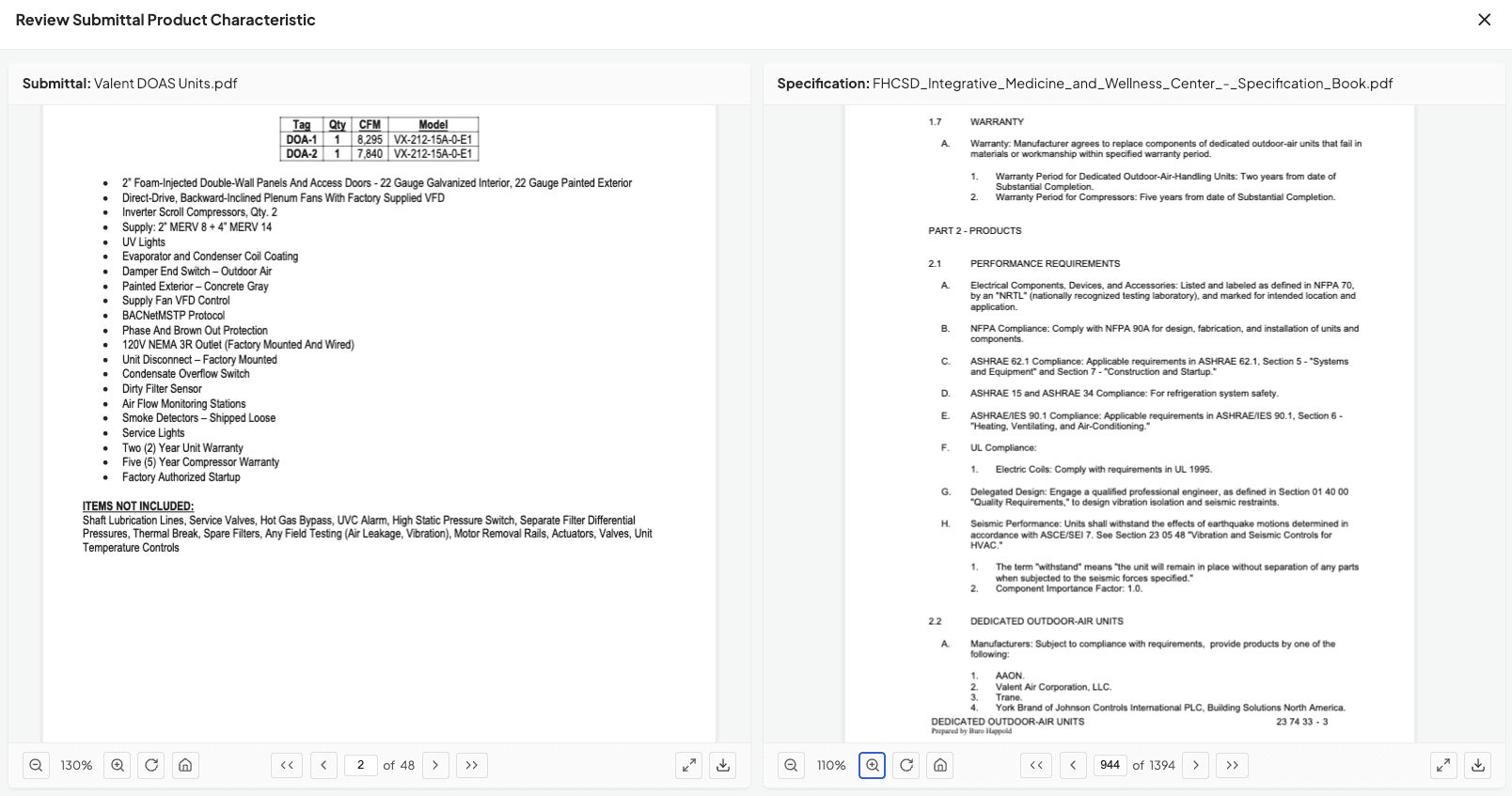
When asked about the MasterFormat divisions consistently causing the most submittal rejections, Tom Port, the co-founder of BuildSync, says:
Most submittal rejections cluster around the MEP divisions, especially HVAC and electrical. Those packages carry the highest concentration of technical performance requirements, so that’s where mismatches are most likely to surface.
How the MasterFormat Numbering System Works
The six-digit numbering system is where most contractors get tripped up - and it's worth understanding it properly, because it's how specs are organized, how submittals are tagged, and how project information is filed across the life of a job.
Each MasterFormat code consists of three pairs of digits representing three levels of specificity:
Level 1 (Division): The first two digits identify the division. Example: 23 = HVAC.
Level 2 (Section Group): The middle two digits identify the section group within the division. Example: 23 74 = Packaged Outdoor HVAC Equipment.
Level 3 (Section): The final two digits identify the specific section. Example: 23 74 00 = Packaged Outdoor HVAC Equipment (the full six-digit spec section).
Some sections include a Level 4 decimal for additional specificity. A rack-mounted computer room air conditioner, for instance, would be 23 81 23.16 - Division 23, section 81 (decentralized HVAC), subsection 23 (computer room units), decimal 16 (rack-mounted).
In practice, every submittal should reference its corresponding spec section number. A plumbing submittal for a commercial water heater should be tagged to Division 22 section, such as 22 33 00 (Electric Domestic Water Heaters). Understanding CSI Division 22 makes it easier to locate the correct specifications, organize submittal logs, accelerate GC review, and reduce back-and-forth caused by mismatched documentation.
Once the correct spec section has been identified, preparing the plumbing submittal package is the next step. This guide walks through the required documentation, certifications, and fixture-by-fixture details that reviewers expect to see.
When creating compliant submittal packages, aligning each package to the correct spec section is a foundational step that shapes everything downstream - from the review process to the final closeout documentation.
What Is the Difference Between UniFormat and MasterFormat in Construction?
UniFormat and MasterFormat are both standards from the Construction Specifications Institute, and they're often confused - but they serve entirely different purposes at different stages of construction projects.
UniFormat organizes construction information by building systems and functional assemblies - by what a building element does. This makes it a natural fit for early design phases and conceptual cost estimating, where teams are thinking about systems before individual products are specified.
MasterFormat is a system for organizing construction information by work results and materials - by trades and products. It answers a different question: not "what does it do?" but "what is it made of and who installs it?"
The practical rule of thumb: schematic design documents and preliminary cost estimates often use UniFormat. Once you're in the construction industry's working documents - the specs, submittals, bids, and procurement records that drive a project from groundbreak to closeout - it's MasterFormat. For GCs and MEP subs, MasterFormat is the operating language of daily project work, and the industry standards that govern the construction industry in North America are organized around it.
Why CSI MasterFormat Is Critical for Construction Specifications
Standardization in construction specifications does more than keep documents organized - it directly affects how accurately submittals can be reviewed and how quickly issues get caught.
When a spec is written with clean, correctly structured MasterFormat division references, a reviewer - human or AI-powered - can efficiently cross-reference a submittal's technical characteristics against the right requirements.
When project specifications are poorly organized or bury technical requirements across multiple sections without clear cross-references, the result is ambiguity. That ambiguity shows up in submittal reviews as unknowns, missed requirements, and ultimately, rejections. The Construction Specifications Institute designed the framework precisely to eliminate these gaps across all project stakeholders.
A well-written Division 23 spec section should tell any reviewer - unambiguously - what refrigerant type is acceptable, what efficiency rating is required, and which manufacturers are approved. That detailed information is what separates a spec that works from one that creates ambiguity.
This is why getting spec structure right from the outset isn't an administrative formality - it's a quality control decision that ripples through every submittal, every review cycle, and every approval on the project. Construction professionals who treat spec quality as a pre-construction priority rather than a documentation afterthought consistently experience fewer rejections downstream. CSI publishes detailed guidance on organizing specifications correctly across all project types, and it's worth referencing as a baseline for any team updating a spec template.
When asked about how quality and structure of project specifications can impact review submittals, Tom Port, the co-founder of BuildSync, explains:
When specs are cleanly structured by MasterFormat division and section, it creates a clear map between the requirements and the submittal data. But in practice, many specs aren’t organized that way. BuildSync is designed to handle both. Clean specs make things easier, but messy ones are the reality on most projects.
How Poor Spec Organization Leads to Submittal Rejections
Here's a connection most MasterFormat guides won't make: the way master spec divisions are structured on a project is one of the under-appreciated root causes of submittal rejections across the construction industry.
Conflicting spec requirements between divisions are more common than they should be - a Division 01 general requirement that contradicts a Division 23 product requirement, or a Division 08 glazing spec that references a superseded industry standard - violating current industry standards without anyone catching it.
When those conflicts exist in the project's specs, they create genuine ambiguity at the submittal review stage. The product data sheet might technically comply with one section while failing another, forcing the reviewer into a judgment call rather than a clear compliance determination.
Outdated master spec divisions compound the problem. If a project's specs are based on an older template that hasn't been updated to reflect current product standards, manufacturers, or refrigerant types - like the industry-wide shift away from R-410A - submittals for compliant products get flagged as failures. The spec structure becomes an obstacle rather than a tool, creating friction for project stakeholders at every level of the review chain.
The forward-thinking approach: treat spec quality as a pre-construction risk factor, not just a construction documentation task. Catching spec conflicts before the first submittal hits your desk is orders of magnitude cheaper than managing the rejection cycle that follows.
When asked about how BuildSync handles conflicting or poorly organized specifications across divisions and what it tells about state of specification writing on commercial construction projects. Tom Port, the co-founder of BuildSync says:
We encounter this all the time. Conflicting or poorly organized specs are more common than most people realize. When BuildSync encounters those situations, it surfaces the conflicting requirements at the product characteristic level, rather than forcing a false pass or fail. In many ways, it highlights a broader reality of the industry, spec writing across projects is often inconsistent.
Spending too much time on Division 23 and 26 submittals?
Navigating Construction Specifications More Efficiently
Understanding the structure is one thing. Using it efficiently on live projects is another. A few practices that make a real difference:
Align your submittal log to spec sections from day one
Our construction submittal log template allows you to organize by MasterFormat division and section number, not just by trade or equipment tag. This creates a direct line between each submittal and the project specs it needs to satisfy - and makes it far easier to track status across a high-volume log.
Know your high-risk divisions before the project starts
Review the spec for Divisions 21–28 during pre-construction. Identify which sections carry the most complex spec requirements, longest lead times, and most restrictive approved manufacturer lists. These are your highest-priority submittals and your earliest schedule risks on any construction project.
On data center projects, Divisions 23 and 26 contain many of the long-lead mechanical and electrical systems that can create data center construction challenges. Because these systems often require early procurement, submittal and approval timing can become a critical factor in maintaining the construction schedule.
Use section numbers on every submittal transmittal
A submittal tagged only as "AHU-1" creates lookup friction. A submittal tagged "AHU-1 / 23 74 00" gives reviewers immediate context and integrates cleanly with construction documentation systems, including Procore.
Teams that have integrated AI-powered submittal review into their workflow find that this kind of spec-section alignment pays compounding dividends - because when submittals are properly tagged and structured, the review process can check each technical characteristic against the exact section that governs it. The result is faster reviews, fewer missed requirements, and a first-time acceptance rate that reflects the quality of preparation that went in.
Teams adopting this at scale are also weighing whether that consistency comes at a cost to how junior engineers develop, since the tool is doing work reviewers used to learn by doing themselves.
For a deeper look at how this works in practice across a full commercial project, see BuildSync's complete guide to the construction submittal review process.
The Link Between Spec Structure and Submittal Performance
MasterFormat is infrastructure. Like the structural frame of a building, it's most visible when something goes wrong - when submittals bounce back because nobody could agree on which spec requirement governed the product, or when a conflict between divisions created weeks of RFI back-and-forth to resolve.
Construction professionals who understand the system at a working level - not just as a reference document but as an active tool for organizing construction projects, structuring submittals, and conducting reviews - consistently see fewer rejections and faster approval cycles. That reflects the fact that spec clarity and submittal quality are directly connected on every construction project. The divisions are the map. Using them well means fewer wrong turns between submission and approval.
The next step beyond understanding the structure is making sure your review process can actually leverage it. See how teams are creating compliant submittal packages aligned to spec section from day one.
Ready to stop losing weeks to submittal rejections? See BuildSync in action - book a demo and run a free pilot on your most complex Division 23 or 26 submittals.
Frequently Asked Questions About CSI MasterFormat Divisions
How to number sections within a CSI MasterFormat division?
Each spec section uses a six-digit number divided into three two-digit pairs. The first pair identifies the division (e.g., 23 for HVAC), the second narrows to the section group (e.g., 74 for Packaged Outdoor Equipment), and the third identifies the specific section (e.g., 00, resulting in 23 74 00). A fourth level using decimal notation (e.g., 23 81 23.16) adds further specificity when needed. Sections within a division are numbered sequentially, with deliberate gaps to allow for future additions to the standardized system without disrupting existing construction documentation.
What is Division 01 in MasterFormat, and why does it matter?
How often is MasterFormat updated?
Can MasterFormat be used by subcontractors, or is it just for GCs?
Related reads for you
Discover more articles that align with your interests and keep exploring.


